
Ri-HUB Call Algorithm
A call from Ri-HUB is a short call with automatic hang-up. The control center initiates the connection, waits for the ringing tone on the subscriber's side and ends the call after 30 seconds or when the user answers the incoming call. Voice guidance, audio messages and tone menu (DTMF) are not implemented in the Ri-HUB firmware. The purpose of such a call is to leave a missed call from the house/object number on the subscriber's phone and to inform the user about an alarm situation.
1. Prerequisites for calls
For Ri-HUB to be able to call the user's number, all of the following conditions must be met at the same time:
No. | Condition | Comments |
1 | The list of users with phone numbers must be loaded into Ri-HUB. The house Owner comes first in the list. |
|
2 | The Owner's phone number must be in international format (starting with the "+" sign). | The RiDom system automatically converts the phone number to international format when the user registers. |
3 | The Owner must have the permission enabled to receive calls in case of an alarm. | In the Owner's settings (the Notifications section of the mobile application), the "Call to your number" option is enabled. If the setting is disabled: • The call will not be made • Other notifications are available: push and SMS (if enabled) How to enable: see Setting up calls in the mobile application. |
4 | At least one SIM card must be active in Ri-HUB and registered in the operator's network. | To make a call, the following conditions must be met: • The cellular network signal is present. • The account has a positive balance or a minutes package. For IoT SIM cards, it is recommended to activate a voice minutes package if the basic tariff does not include outgoing calls. • The SIM card is not blocked by the operator. For Ri-HUB-1 (one SIM): • The SIM card is registered in the network. For Ri-HUB Ultra/Pro (two SIMs): • At least one SIM card is registered in the network. |
5 | At least one area of the house/object must be in "Armed" mode. | A call is initiated only when security is active. The "24 hours" mode (round-the-clock protection of individual detectors) is not a condition for calling the house/object Owner. The house/object can be in either "Full arming" or "Partial arming" mode. |
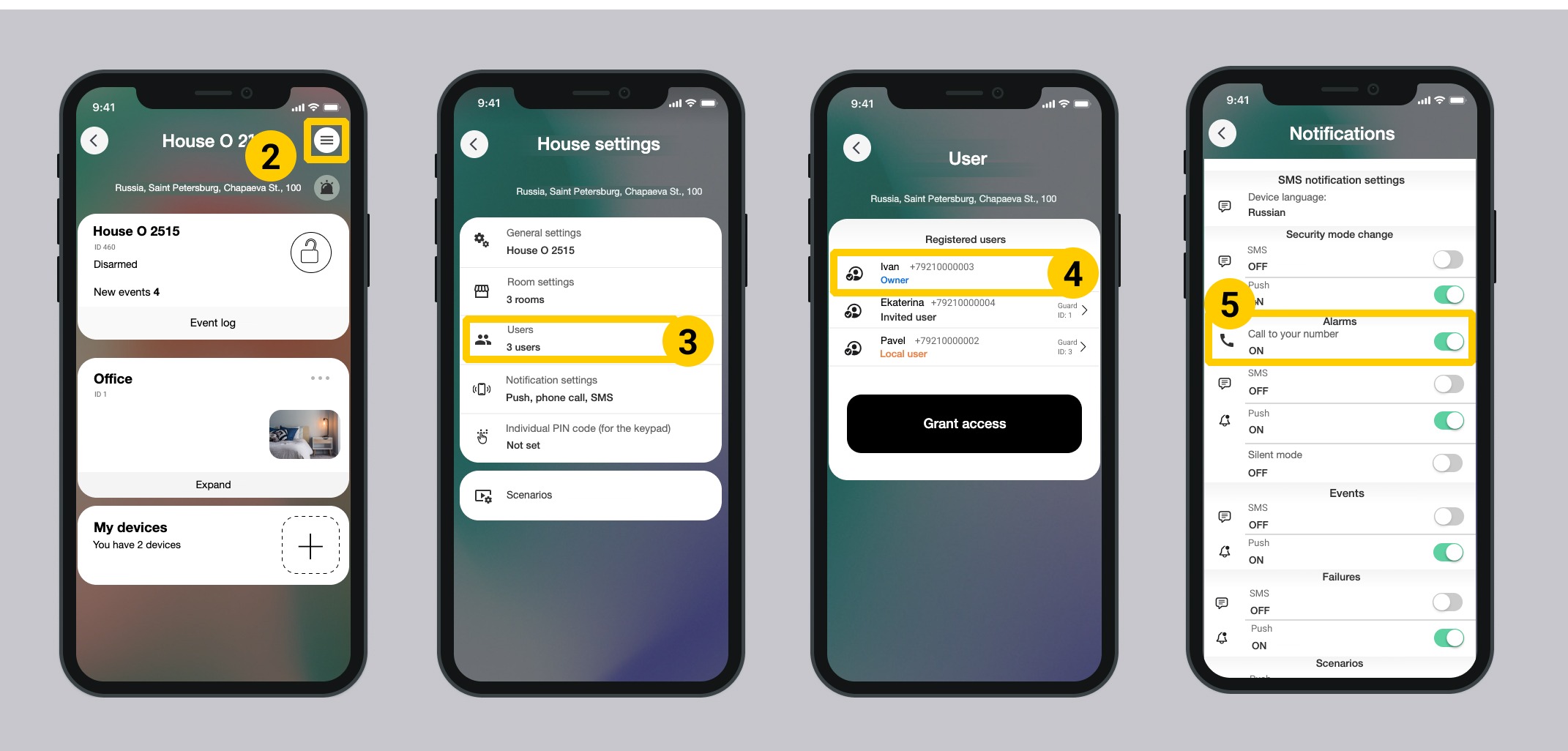
Setting up calls in the mobile application
In the mobile application, you can change user permissions while the house/object is armed.
1. Select the required house on the My Homes screen.
2. Tap Settings  in the upper right corner.
3. Tap Users.
4. Select the first user in the list, the house Owner. Learn more about user types in the article.
5. Turn the Call to your number setting on or off in the Alarms section.
2. Call conditions
Below are the events for which Ri-HUB calls the house/object Owner. If no call is initiated, the user receives a notification through other channels (push or SMS) if the corresponding settings are enabled. Learn more about other ways of notifying users in case of an alarm.
2.1. Events that trigger a call ✅
Calls are made only when a security zone of the detectors is triggered. Detectors with a temperature channel, the keypad, relays and the siren are not security zones. An attempt to declare them as security zones will be ignored.
The following events are registered in "Armed" mode:
No. | Events | Comment |
1 | Motion | A motion and opening detector was triggered |
2 | Smoke | A smoke detector was triggered |
3 | Leak | A leak detector defined as a security detector and not in the 24-hour zone was triggered |
4 | Glass break | A glass break detector or a combined detector was triggered |
5 | Opening | An opening detector or a combined detector was triggered |
2.2. Events that do NOT trigger a call ❌
The Owner and other users receive only a push notification or SMS if the corresponding setting is enabled.
No. | Events | Comment |
1 | A silent alarm is triggered (from a key fob or keypad) | |
2 | Power loss: switching to the battery | Technical limitation: at voltages below 3.6 V, the modem built into Ri-HUB does not work. A low battery notification is sent at 3.4 V. Ri-HUB monitors modem shutdown and tries to turn it on, but without power the modem cannot register in the cellular operator's network. |
3 | Loss of GSM signal or Wi-Fi/Ethernet | |
4 | Arming or disarming | |
5 | Detector malfunction (loss of connection) | |
6 | Opening of the Ri-HUB or detector housing (the tamper of Ri-HUB or of a security detector was triggered) | A call is made only for events of security detectors triggering in the main zone. |
7 | Loss of connection between Ri-HUB and the RiCloud cloud server in "Armed" mode | |
8 | Temperature and humidity deviations from the ranges set in the settings:
| A call is made only when a security zone of the detectors is triggered; temperature detectors are not security zones. |
9 | Triggering of actuators: siren or relay |
3. Call generation algorithm
When an alarm occurs (see section 2):
- Ri-HUB reads the first user in its local table.
- It retrieves the phone number of the first user in the list, the house/object Owner.
- It checks the status of the active SIM. Learn more about SIM cards in section 5.
- It calls the Owner's number using the built-in modem.
- If the call to the Owner goes through → the call lasts 30 seconds and is then ended.
- If the call to the Owner does not go through → there will be no repeat call.
3.1. Notification sending order
The call to the house Owner and SMS messages to all house users with the corresponding setting are initiated in parallel. However, due to the way the GSM module works (a single radio channel), the call takes priority.
- If the mobile network is available: The call is made immediately. SMS sending is queued and performed right after the call ends or the channel becomes free.
- If the mobile network is unavailable: The call request is saved. As soon as network registration is restored (for example, after the SIM card is replaced or the signal appears), Ri-HUB will first try to make the call. SMS messages will be sent after that.
SMS queue limitations:
The system creates a queue of outgoing messages with a capacity of up to 40 events. Messages are sent one by one as the communication channel becomes free.
Important!
The call is made only once per armed period. After the call, repeated detector triggers do not cause new calls. To receive a call again in case of an alarm, disarm the object and arm it again.
The call to the Owner is duplicated by sending push notifications and SMS to other users (if the corresponding settings are enabled). All communication channels are activated simultaneously when an alarm occurs, but the delivery speed may differ.
4. Changing the house/object Owner
- When the house/object Owner changes, the RiCloud cloud server creates a new list of users in which the new Owner takes the first position.
- The updated list of users is sent to Ri-HUB during the next synchronization with RiCloud.
- Ri-HUB overwrites the local user table of the control center: the new Owner becomes the recipient of alarm calls.
- The previous Owner gets the "Invited user" role, if not removed from the list, and gets any free sequence number in the list. Learn more about user roles ...
5. Specifics of Ri-HUB modifications
Depending on the model, Ri-HUB supports a different number of SIM cards and network technologies. This affects the reliability of voice notification and the device behavior when the connection is lost.
Modification | Number of SIMs | Network | Specifics |
Ri-HUB Ultra | 2 | 2G 4G |
|
Ri-HUB Pro | 2 | 2G |
|
Ri-HUB-1 | 1 | 2G |
|
(*) Once every 48 hours, the active SIM is changed forcibly to avoid temporary blocking of the SIM by the mobile operator if the SIM has not been active in the operator's network for 72 hours or when returning from international roaming. Relevant only for users in Russia. This way, the house Owner can receive calls from both SIM cards.
If the 4G network is forcibly blocked at the request of government authorities, Ri-HUB switches the modem to operate in the 2G network. If the 2G network is forcibly blocked, Ri-HUB will not be able to make calls.
6. SIM card selection and calling algorithm
6.1. For Ri-HUB-1 (one SIM card)
- Before the call, Ri-HUB checks the registration status of the SIM card in the operator's network.
- If the SIM is registered, a call to the Owner is initiated.
- If the SIM is not registered (no network, the card is removed or blocked), the call request is saved in the device's internal queue. The call attempt will be repeated automatically right after network registration is restored. There is no waiting time limit.
6.2. For Ri-HUB Ultra and Ri-HUB Pro (two SIM cards)
- Ri-HUB checks the registration status of the currently active SIM card.
- If the active SIM is not registered in the network, the controller automatically switches to the second SIM card and makes it active. Ri-HUB polls the slots one by one and records the registration status.
- If neither SIM card is registered in the network, a voice call is not possible. In this case, users are sent an SMS notification about the event that caused the alarm (if there is at least a minimal signal for sending SMS).
7. Technical specifics of calling
This section describes the parameters of the call notification system that determine Ri-HUB behavior when trying to call the Owner. These parameters are built into the control center firmware and do not require configuration by the user.
Parameter | Value |
Number of call attempts to the Owner's number | One attempt. No repeat call is made. |
Waiting for the subscriber to answer | Not required. Ri-HUB does not analyze whether the call was picked up or whether there is voice on the line. The call is considered successfully made as soon as the connection with the operator's network is established, regardless of the subscriber's actions. |
Interval between repeat attempts | In case of an alarm, there is one call attempt; the second and subsequent alarms do not trigger a call until the object is re-armed. Repeated triggering of the same or another detector within one arming period does not trigger a call. |
Maximum call duration | 30 seconds, after which the call is automatically ended. |
Number of call recipients | One subscriber: the Owner only (the first in the list of users). |
Call frequency limit | One call per armed session. To receive a new call, disarm the object and arm it again. |
Event deduplication | If many detectors are triggered at once (for example, 10 detectors within a minute), the call is made only for the first event. |
8. Call scenarios and results
The table describes possible scenarios when attempting a call and shows what happens in the system and what the Owner sees in each case.
Scenario | What happens | What the Owner sees |
The subscriber is on another call (the line is busy) | The call does not go through; there is no repeat attempt | Nothing. Only an SMS and a push notification will arrive (if the settings are enabled) |
The subscriber declined the call | The call is ended | A missed call |
The phone is off or out of network coverage | The call is considered completed | Nothing. Only an SMS and a push notification will arrive (if the setting is enabled) |
The subscriber did not answer within 30 seconds | The call is automatically ended | A missed call |
Ri-HUB has no mobile connection (no SIM, no network, no tariff) | A call is not possible until the connection is available | A push notification (if Wi-Fi/Ethernet is available). When the connection is restored, a delayed call will be made and an SMS will arrive |
Important!
None of the modem responses leads to a repeat call, and none of them is recorded anywhere: neither in the log nor in data sent to the RiCloud cloud server. In the firmware, all four cases end the same way: "call made". Based on the control center data, it is impossible to tell the situation "the Owner has been notified" from "the phone was off".
9. Technical specifics of 2G and 4G networks
The Ri-HUB Ultra control center is equipped with a modem that supports 2G and 4G (LTE) networks. However, the functionality of these networks differs.
9.1. Network limitations
- Calls and SMS: Work only in the 2G network. In 4G (LTE) mode, making calls and sending SMS is not possible.
- Data transfer (GPRS) to the RiCloud cloud server: Available in both modes.
9.2. Network switching algorithm
The network is selected automatically by the modem:
- 2G priority for communication. For critical functions (call, SMS), the modem forcibly uses the 2G network. Even if the device is within 4G coverage, it will switch to 2G when it needs to make a call.
- Using 4G for data. The 4G mode is used mainly for transferring data to the RiCloud server.
- Switching process. The network mode change (for example, from 4G to 2G for a call) is performed through a short modem reset.
- Registration in the new network takes about 120 seconds.
- During switching, the connection with the RiCloud cloud server is interrupted if Ri-HUB communicates with RiCloud only via the GSM channel (backup channel). If Ri-HUB uses the main communication channel (Wi-Fi or Ethernet) and the duplicate GSM channel, the connection with the RiCloud cloud server remains stable.
- The user does not receive connection loss notifications during regular network switching, to avoid false alarms. If Wi-Fi/Ethernet is unavailable at that moment, the connection with the server is temporarily unavailable.
9.3. GSM signal type indication
While the network mode is changing (2G ↔ 4G), there is no special light indication on the housing. The network status is displayed only in the RiCloud administrative interface (network type: 2G or 4G).
9.4. Ri-HUB start-up
The time it takes to connect after power-on depends on signal reception conditions. In an area with good LTE (4G) reception, registration can take up to 2 minutes.
9.5. No 2G
If 2G is not available because the operator has shut down the network, the control center will not be able to make calls and send SMS, even if there is a 4G signal.
10. Backup notification scenarios
In case of an alarm, at the same time as the call to the Owner, the following is sent to users:
- SMS to all users who have the corresponding setting enabled
- Push notification to all users who have the corresponding setting enabled
- An event to the RiCoder security server, if the house/object is monitored by a security company
If a call is not possible (no SIM, no network, no tariff), a push notification is sent if Ri-HUB has a connection via the Ethernet/Wi-Fi channel.
If Ri-HUB had no connection at the time of the alarm, the call request will wait to be passed to the built-in modem. As soon as the connection is restored, the SIM will register in the network and the call will be made to the Owner. The call will be made before the event is sent to the RiCloud cloud service. There is no waiting time limit.
Last updated: 10/13/2026
No comments to display
No comments to display