
RiCoder Configuration Errors
1. Incorrect port number specified in the RiCoder installation wizard
The installation wizard cannot bind the specified port to the RiCoder container.
Error text: invalid hostPort: 333333
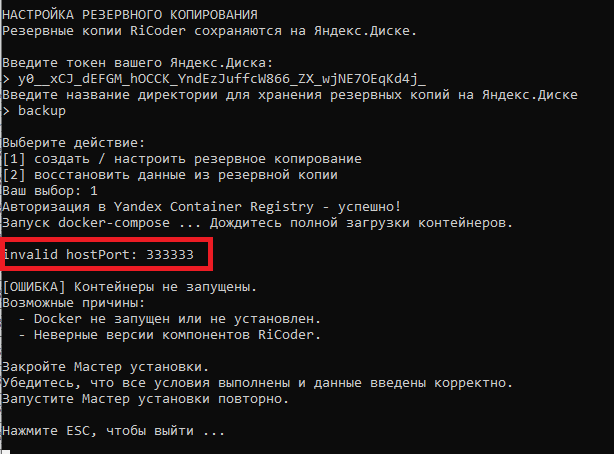
Cause of the error
The specified port is outside the allowed range for Ri-HUB. Use a port number in the range from 10000 to 65535 inclusive.
Solution
- Close the installation wizard.
- Start the installation wizard again and go through the dialog steps.
- Enter the correct port for connecting the Ri-HUB control center(s).
2. Backups are missing on Yandex.Disk
The backup directory and files are missing on your Yandex.Disk after RiCoder was successfully installed or updated on the server.
Causes of the error
Cause | Solution |
An incorrect token was entered in the installation wizard dialog, or there is a typo. |
|
The Yandex.Disk token has expired. | Update the token manually in the Yandex.OAuth service. Learn more in the RiCoder installation instructions, section Obtaining an access token for Yandex.Disk. |
Last updated: 09/29/2025
No comments to display
No comments to display