
Container Registry Authorization Errors
1. Authorization Error When Pulling RiCoder Containers
The installation wizard cannot find the registration key file (*.json) required to connect to the Yandex Docker container registry.
Error text: Authorization error

Cause of the error
- The registration key file *.json is missing from the
/CHOP_DEPLOY/directory. - The *.json file name was entered incorrectly – a file with such a name does not exist in the
/CHOP_DEPLOY/folder.
Solution for Windows OS
- Close the installation wizard. Press ESC.
- Place the registration key file *.json into the
/CHOP_DEPLOY/directory. - Launch the installation wizard.
- Proceed through the steps of the installation wizard dialog.
Solution for Linux OS
1. Close the installation wizard. Press ESC.
2. Place the registration key file *.json into the /CHOP_DEPLOY/ directory.
3. Launch the installation wizard. Run the command:
./launcher_linux4. Proceed through the steps of the installation wizard dialog.
Solution for Linux OS when manually updating RiCoder
When manually launching containers without using the RiCoder installation wizard, there are specific considerations for using the docker pull command.
Attempting to pull a container image from a remote repository without prior authorization to the Yandex Docker container registry using the command:
docker pull cr.yandex/crp9t9tcd2mq4pdn52fm/chop-deploy-eqgateway-1results in the following error:
Error response from daemon: Head "docker pull cr.yandex/crp9t9tcd2mq4pdn52fm/ chop-deploy-eqgateway-1 ": unauthorized: Username 'test' is invalid - must be iam, oauth or json_key.The correct way to authorize in the Yandex Docker container registry is by using a JSON key. Without this step, you will not be able to access private RiCoder images.
- To correctly pull containers, follow these steps:
- Ensure that the registration key file for accessing the registry is located in the /CHOP_DEPLOY/ directory.
cat /CHOP_DEPLOY/authorized_key.json | docker login --username json_key --password-stdin cr.yandexPull the container image:
docker pull docker pull cr.yandex/crp9t9tcd2mq4pdn52fm/ chop-deploy-eqgateway-12. Error When Pulling RiCoder Container Images
The installation wizard displays a Docker Compose error:
Error text: Error response from daemon: failed to resolve reference "cr.yandex/crplu9iv3k90bpg8iki/surgard-prod:2025-04-28-ddc": cr.yandex/crplu9iv3k90bpg8iki/surgard-prod:2025-04-28-ddc: not found
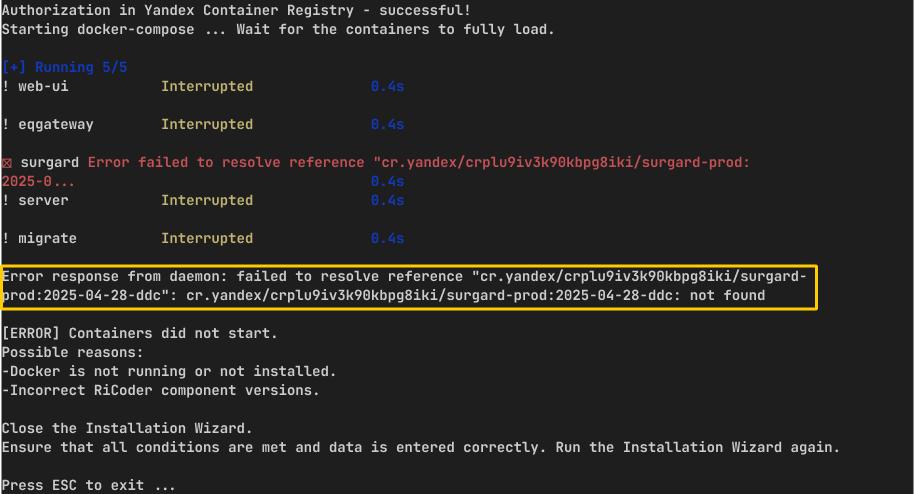
Cause of the error
Incorrect version numbers were entered in the installation wizard dialog.
Solution for Windows OS
- Закройте мастер установки.
- Запустите мастер установки снова и пройдите шаги диалога.
- Введите корректные номера версий BAC-version и ricoder_dashboard ver.
Solution for Linux OS
1. Close the installation wizard.
2. Launch the installation wizard again and proceed through the dialog steps.
./launcher_linux3. Enter the correct version numbers for BAC-version and ricoder_dashboard ver.
The latest version numbers for RiCoder components are listed on the official RiCoder software page next to the download link for the latest release.
Update date 06.26.2026
No comments to display
No comments to display