
Entry and exit delay
Entry and exit delays in a security system give time to enter or exit a room without triggering an alarm. Set up an entry delay to allow time to disarm the system. Exit delay will allow you to leave the premises after the security is turned on.
Entry and exit delaysod are supported only by motion detectors Ri-MD-1 and opening Ri-DO-1.
Entry/exit delay is a potential vulnerability, as it gives attackers additional time to penetrate a protected facility. If you want the alarm to be transmitted instantly, do not use an entry/exit delay.
If the keyboard is not added to the RiDom system, then the entry and exit delay function is available in the opening detector settings.
1. Exit delay
Exit delay is the time you have to leave the premises after arming the security mode. The system waits until you leave the room and does not raise an alarm based on security events from motion and opening detectors.
1.1. Delay setting
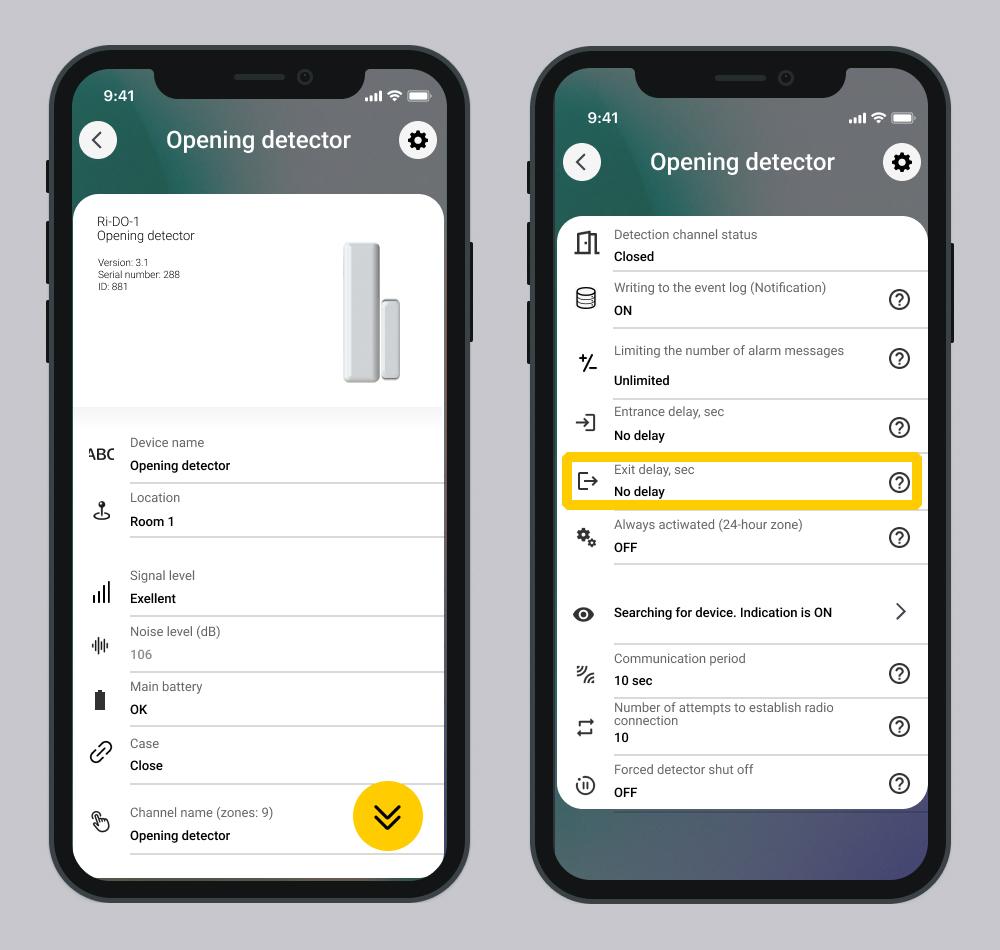
The exit delay is set in the device settings (motion and opening detector).
Available exit delay parameters: 30\40\50\60\90\100\110\120\180\240.
Screen Setting up the opening detector
1.2. Calculation of exit delay time
The exit delay is calculated based on the detector that has the maximum delay among all security detectors of the selected room or house/object, if the entire house is armed.
Example: There are three detectors in the room with a time delay for exit of 30/60/90 seconds. The maximum exit delay time is 90 seconds.
Events that occur during the delay period are not recorded in the log.
1.3. How exit delay works
1. After pressing the key fob button and entering the code on the keyboard, the countdown starts exit delay.
2. The security system waits until the initiator of arming leaves the premises.
If the security detector is triggered while the exit time is counting down, the security detector does not send an alarm to the controller.
3. When the exit time expires:
- The system will arm only those premises that are allowed for the entered code or assigned to the key fob user.
- An event is generated in the log - Armed.
- Control device behavior:
Control Device | Behavior |
Ri-Key-1 Key Fob | Lights up green for 3 seconds. |
Ri-KB-1 Keypad | Emits a single "beep". The signal may arrive with a slight delay. |
Ri-KB-2, Ri-KB-3 - Sensor Keypad | Emits a single "beep". The signal may arrive with a slight delay. |
Control Hub | Emits a repeating sound throughout the entire exit delay interval. |
Siren | Does not emit any sound signals. |
4. If the initiator of arming did not have time to leave the premises, an alarm will sound.
- An event is generated in the log - Alarm.
- Control device behavior:
Control Device | Behavior |
Ri-Key-1 Key Fob | Does not emit any sound signals. |
Ri-KB-1 Keypad | Does not emit any sound signals. |
Ri-KB-2, Ri-KB-3 - Sensor Keypad | Does not emit any sound signals. |
Control Hub | Emits 3 long "beeps" in a row, looping while the alarm is active. |
Regardless of the settings of the detector delay parameters, the indication on the “keyboard” actuator flashes green for 60 seconds.
1.4. Indication on the controller and actuators during the delay
Control Device | Behavior |
Ri-Key-1 Key Fob | Does not emit any sound signals. |
Ri-KB-1 Keypad | Flashes green for 60 seconds. |
Ri-KB-2, Ri-KB-3 - Sensor Keypad | Flashes green for 60 seconds. |
Control Hub | Emits a repeating sound throughout the entire exit delay interval. |
The devices do not have color indication.
2. Entry delay
Entry delay (alarm activation delay) — this is the time you have to disable the system security mode after entering room.
If a delay is set, the armed device starts a countdown and does not raise an alarm until it completes. This operating mode is intended for devices that control the entry point to an object and the exit point from a protected object. An event arrives; there is a delay at entry; look elsewhere
2.1. Delay setting
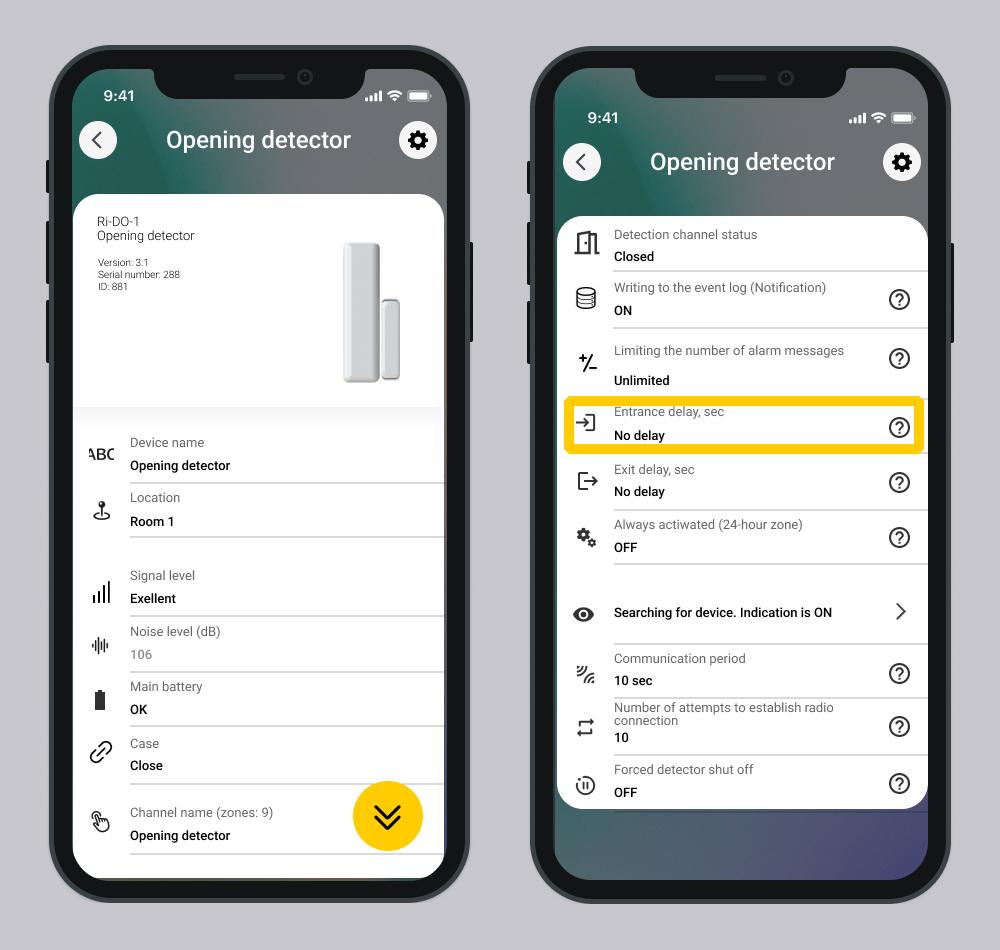
The entry and exit delay is set in the device settings (motion and opening detector):
Available exit delay parameters: 30\40\50\60\90\100\110\120\180\240.
Screen Setting up the opening detector
2.2. How Entry Delay Works
1. You enter a protected premises, an opening or motion detector is triggered.
2. The controller registers a technical alarm:
- The system includes a countdown;
- An event is generated in the log - Attention input. Start of delay countdown.
- Duplicate detectors do not raise an alarm.
3. During the countdown, you disarm the house/object or premises by any means (mobile application, keyboard, key fob)
- An event is generated in the log - Disarmed.
- Control device behavior:
Control Device | Behavior |
Ri-Key-1 Key Fob | Does not emit any sound signals. |
Ri-KB-1 Keypad | Does not emit any sound signals. |
Ri-KB-2, Ri-KB-3 - Sensor Keypad | Does not emit any sound signals. |
Control Hub | Emits a repeating sound throughout the entire entry delay interval. |
4. If you did not manage to disarm the house/object or premises within the specified time, an alarm will sound.
- An event is generated in the log - Alarm.
- Control device behavior:
Control Device | Behavior |
Ri-Key-1 Key Fob | Does not emit any sound signals. |
Ri-KB-1 Keypad | Does not emit any sound signals. |
Ri-KB-2, Ri-KB-3 - Sensor Keypad | Does not emit any sound signals. |
Control Hub | Emits 3 long "beeps" in a row, looping while the alarm is active. |
If several detecors with a set entry time are violated in a room, an alarm is generated upon completion of the first expired timer, based on the minimum time of the active entry timers.
Description of the software operation is relevant for versions:
- RiDom application - v. 1.1.273
- iCloud cloud service - v. 2026-06-17-8fd1236
- Controller firmware - v. XX.1.81
Update date: 06/24/2026
No comments to display
No comments to display