
Directory of events in the mobile application
This directory contains all types of events that the RiDom system can record and transmit to the mobile application. The article provides event names, codes, explanations and an indication of whether they are recorded in the event log and whether they are accompanied by push notifications.
Events are grouped by categories:
- change security mode,
- hardware malfunction,
- alarming situations,
- information events,
- user management and automation.
This information will help you quickly understand what each notification means, take appropriate action, and set up push notifications in your mobile app for each category.
In the RiDom mobile application, events are displayed in Event Log, and in the smartphone in push notifications.
Screen: Notification
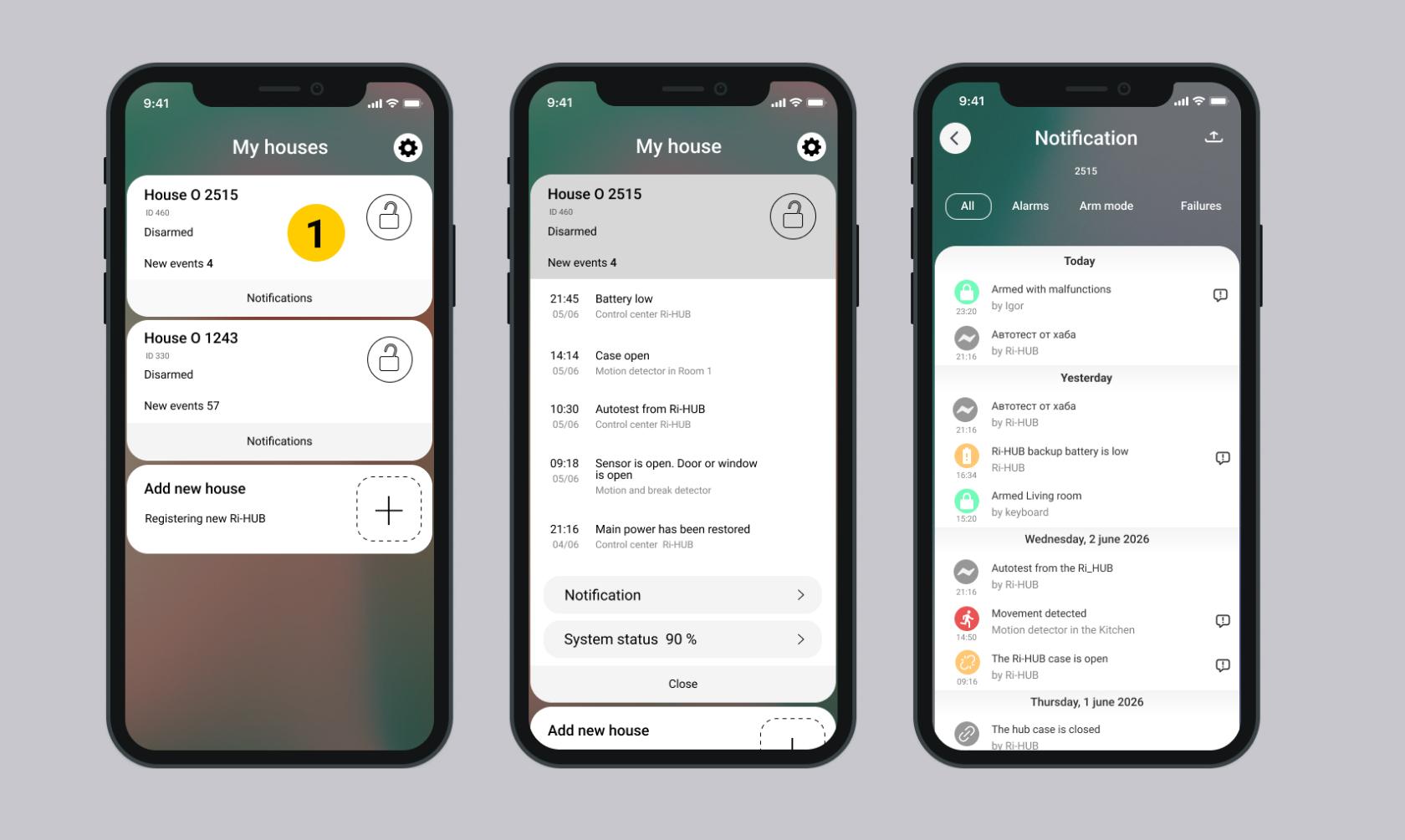
Event Color | Description | |
| Messages about intrusion, fire, flooding, temperature | Alarms. More details... |
| Notifications about loss of communication, jamming, low battery or opening of the sensor housing | Malfunctions. More details ... |
| Alarm and fault recovery notifications + general information events | Information events. More details ... |
| Notifications arrive after arming/disarming | Security. More detail ... |
| Notifications about events related to relay control, socket control, scenario, etc. | Automation scripts. Control |


Events in the log can be filtered by type. 3 filters configured:
- Alarms
- Arm mode
- Faults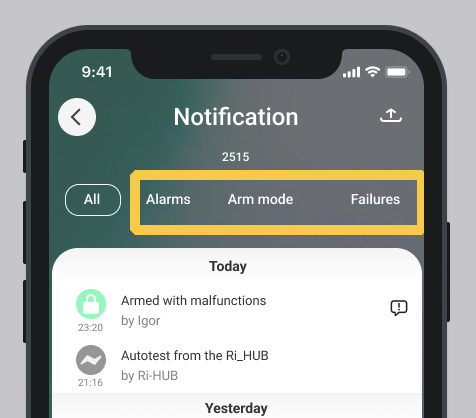
1. Changing the security mode
Code RiDom | Event log / PUSH | Event text | Description |
4.7.1 | yes | Armed | The object has been successfully secured. |
4.7.0 | yes | Disarmed | The object has been successfully disarmed. |
0.11.1 | yes | Disarmed | The object was disarmed using duress code. Outwardly it looks like a normal withdrawal, but the system secretly sends an alarm. |
4.8.1 | yes | Armed with faults | The object is armed forcibly, despite the presence of faults (for example, an open door or a faulty detector). |
4.26.1 | yes | Arming rejected | An attempt to arm the object rejected (for example, due to an open door or an active alarm). |
4.27.1 | yes | Disarming rejected | Attempt to disarm rejected. Attempt to disarm the premises using the keypad at a prohibited time (outside the schedule). |
4.27.1 | yes | Attempt to disarm outside the schedule | An attempt to disarm a house/object or premises from the keyboard at a time when the schedule is blocking disarming at the moment. (for example, during the day when you are away). |
2. Malfunctions
- Hardware faults
- Power problems
- Connection problems
- Update errors and system crashes
- Interaction with a security company
Hardware malfunctions
Code RiDom | Event log / PUSH | Event text | Description |
1.9.1 | yes | The control center housing is open | Someone opened the Ri-HUB case. This may be a sign of unauthorized access or technical tampering. |
1.10.1 | yes | The case is open | The housing of one of the security devices (detector, relay, etc.) has been opened. Check the device for damage. |
2.7.1 | yes | Detection channel failure | There has been a break or complete failure of the detector (motion, smoke, etc.). The device no longer transmits data. |
2.8.1 | yes | Detection channel failure | The detector is unstable or produces erroneous data. May interfere with arming. |
185.14.0 | yes | Detection channel failure | Error in the operation of the detector (for example, smoke): diagnostics or replacement are required. |
Power problems
Code RiDom | Event log / PUSH | Event text | Description |
2.29.1 | yes | Main power failure | Ri-HUB has lost power from the mains. Currently running on backup battery. |
2.38.1 | yes | Backup battery is low | The charge level of the Ri-HUB backup battery is low. Make sure Ri-HUB is connected to the network. |
2.253.1 | yes | Battery level is critically low | The backup battery is almost completely discharged. If the network is disconnected, Ri-HUB may stop working. |
6.8.1 | yes | Low battery | The battery in the detector or device is discharged. Needs replacement. |
6.9.1 | yes | Battery replacement required | The battery in the detector is completely discharged. The device may stop responding. |
Connection problems
Code RiDom | Event log / PUSH | Event text | Description |
2.3.1 | yes | Device unavailable | One of the connected devices has stopped responding (loss of radio communication, power, etc.). |
7.0.1 | yes | Loss of communication with the control center | Ri-HUB has lost connection to the cloud service. Notifications may not be received. |
256.0.1 | yes | Loss of communication with the control center | Loss of connection between Ri-HUB and RiCloud. The event is generated in RiCoud. |
256.0.6 | yes | Loss of Wi-Fi connection | Ri-HUB cannot connect to the Internet via Wi-Fi. Check your router and network settings. The event is generated in RiCoud. |
256.0.3 | yes | Connection with the control center via WiFi is lost | Problem with Ri-HUB Wi-Fi connection. The event is generated in RiCoud. |
256.0.2 | yes | Connection with the control center via GSM channel is lost | There is a problem with the GSM module or there is no cellular signal. The event is generated in RiCoud. |
256.0.7 | yes | Connection with the control center via GSM channel is lost | The GSM channel is unavailable or disabled. The event is generated in RiCoud. |
7.25.0 | yes | Connection with the control center via Ethernet is lost | Problem with wired Internet connection. Check cable and network settings. |
284.0.3 | yes | Communication test failed | Automatic server ping failed. |
Update errors and system crashes
Code RiDom | Event log / PUSH | Event text | Description |
5.3.65 | yes | Firmware update failed | The Ri-HUB firmware or radio module firmware update was interrupted or completed with an error. |
2.2.1 | yes | BRHS is not responding | The alarm loop expansion unit (BRHS) is not responding. There may be a hardware failure or connection problem. |
Interaction with the security company
Code RiDom | Event log / PUSH | Event text | Description |
0.0.2 | yes | Your application to the security company has been rejected. | The application for monitoring from the owner of the property was rejected by the security company. The event is generated by RiCoder provided that the object is armed. |
0.0.4 |
yes | Security services are disabled in <Company Name> | Facility monitoring has been stopped by the security company. The event is generated by RiCoder provided that the object has been protected. |
3. Alarms
- Moving and opening doors
- Fire and smoke
- Water leak
- Glass Breaking
- Panic buttons and enforcement actions
- Temperature and humidity deviations
- Loss of communication with the center (alarm mode)
Moving and opening doors
Code RiDom | Event log / PUSH | Event text | Description |
0.2.1 | yes | Motion detected | The motion detector has triggered. Zone violated. Perhaps someone has appeared in the surveillance area. |
256.3.1 | yes | The detector is broken | The event is generated in RiCoud based on event 0.2.1 and provides the user with detailed information about the motion detector. |
Fire and smoke
Code RiDom | Event log / PUSH | Event text | Description |
0.21.1 | yes | Smoke detected | The smoke detector has tripped. There may be a fire hazard - an inspection of the premises is required. |
Water leakage
Code RiDom | Event log / PUSH | Event text | Description |
8.15.1 | yes | Leak detected | The water leakage detector has tripped. There may have been an accident with pipes or household appliances. |
Glass Breaking
Code RiDom | Event log / PUSH | Event text | Description |
256.4.1 | yes | Glass breaking | The acoustic glass break detector has triggered - a window or glass display case may have been broken. The event is generated in RiCoud. |
Panic buttons and forced actions
Code RiDom | Event log / PUSH | Event text | Description |
1.11.1 | yes | Panic button | A push-button alarm transmitter (for example, a key fob or a code on a keypad) was pressed. |
1.30.1 | yes | The body of the device is open under protection | During security, the device case was opened - the system regards this as penetration. |
257.7.0 | Notifications: yes PUSH: no | Disarming under duress | The user entered duress code - externally the system is disarmed, but secretly sent push -notification of alarm to other users at home and the alarm is displayed in their event log. To the mobile application of the user who cleared the alarm:
|
257.8.0 | Notifications: yes PUSH: no | Silent alarm triggered | Activated hidden alarm (for example, when there is a threat from an attacker). The notification may not arrive via push, but is recorded in the log and sent to monitoring. |
Temperature and humidity deviations
Code RiDom | Event log / PUSH | Event text | Description |
185.2.0 | yes | Temperature is above normal | The temperature has exceeded the permissible threshold (for example, in a server room or children's room). |
185.3.0 | yes | Temperature below normal | The temperature has dropped below the permissible level. |
185.12.0 | yes | Humidity is above normal | High humidity - possible mold or condensation. |
185.13.0 | yes | Humidity is below normal | Air that is too dry can be uncomfortable or harmful to equipment or health. |
Loss of communication with the control center (alarm mode)
Code RiDom | Event log / PUSH | Event text | Description |
256.1.1 | yes | Loss of communication with the control center | Ri-HUB cannot communicate with RiCloud or RiCoder for a long time. The system considers this an alarming situation, since notifications may not be received. The event is generated in RiCoud. |
0.0.6 | yes | No Wi-Fi connection | Ethernet No connection via SIM channel | Loss of connection with RiCoder. Depending on the communication channel through which the connection was lost, the corresponding channel is indicated in the event name (Wi-Fi | Ethernet or SIM). The event is generated by RiCoder provided that the object is protected. |
4. Information events
- Recovery from alarms and faults
- Object and user management
- Technical and service events
- Security: repeated and service actions
- Siren control
- Relay control (load on/off)
- Interaction with a security company
Recovery from alarms and faults
Code RiDom | Event log / PUSH | Event text | Description |
0.2.0 | yes | The movement has stopped | The motion detector no longer detects activity - the zone is back to normal. |
0.21.0 | yes | Smoke detector reset | The smoke disappeared, the detector returned to normal. |
1.9.0 | yes | The control center housing is closed | The Ri-HUB case is closed again - the threat of opening has been eliminated. |
1.10.0 | yes | The housing is closed | The housing of the device (detector, etc.) is closed - the malfunction has been eliminated. |
2.3.0 | yes | The device is back online | The device that was unavailable has restored communication. |
2.29.0 | yes | Restoring main power | Ri-HUB is again receiving power from the network. |
2.38.0 | yes | The backup battery charge is normal | The backup battery is charged - the system power supply is stable. |
8.15.0 | yes | Leak fixed | The water detector no longer detects moisture - the problem has been resolved. |
185.1.0 | yes | Temperature is normal | The temperature has returned to the acceptable range. |
256.3.0 | yes | The detector has been restored | A door or window that was open is now closed. The event is generated in RiCoud. |
Object and user management
Changes to object structure or access rights.
Code RiDom | Event log / PUSH | Event text | Description |
8.100.0 | yes | Object created | A new protected object (house, apartment) is registered in the system. |
8.100.1 | yes | Object deleted | The object has been deleted from the system. |
257.3.0 | yes | The user has been added to the home (accepted the invitation) | A new user has gained access to the object. |
257.3.1 | yes | The user has been removed from home | The user no longer has access to managing the house (facility). |
257.3.2 | yes | An invitation has been sent to the user. | The owner invited a new user. |
257.3.3 |
yes | The invitation has been removed. | The invitation has been cancelled. |
257.3.4 | yes | The owner of the house has changed. | Owner rights have been transferred to another user. |
Technical and service events
Updates, reboots, scripts, settings - no worries.
Code RiDom | Event log / PUSH | Event text | Description |
5.2.0 | yes | Switching off Ri-HUB | Ri-HUB is turned off (for example, the power is turned off). |
5.2.1 | yes | Enabling Ri-HUB | Ri-HUB is turned on and working. |
5.3.0 | yes | Firmware updated successfully | Ri-HUB firmware update completed successfully. |
5.3.1 | yes | Firmware update started | The installation of a new firmware version has begun. |
284.0.0 | yes | Periodic communication testing is enabled | The system will automatically check communication with the cloud. |
284.0.1 | yes | Periodic communication testing is disabled | Communication autotest is disabled. |
284.0.2 | yes | Automatic communication testing | Successful connection check with the server. |
284.0.4 | yes | Automatic communication test settings have changed | The autotest interval or parameters have been changed. |
99.1.0 | yes | Automatic shutdown when the number of alarms is exceeded | The number of alarm messages sent is limited when the number of alarm messages only from security detectors (movement, opening, breaking) is exceeded. Once the limit is exceeded, messages are not sent. The limit is configured in the RiDom mobile application. |
Security: repeated and official actions
The events in the table below are not alarms - informational events. They inform about:
- recovery after incidents,
- technical operations (updates, reboots),
- changes in settings or system composition.
Code RiDom | Event log / PUSH | Event text | Description |
4.9.0 | yes | Disarmed again | The system detected a repeated attempt to disarm the object, although it had already been disarmed. This can happen when the command is automatically repeated due to a temporary loss of communication between Ri-HUB and RiCloud or when the button on the key fob is pressed multiple times. |
4.9.1 | yes | Re-arming | Re-arming. |
3.1.1 | yes | Entry delay countdown | There is a countdown before the alarm is activated upon entering the protected area. |
Siren control
Code RiDom | Event log / PUSH | Event text | Description |
5.30.1 | yes | Siren on | The siren has been activated - for example, during an alarm or manually through a mobile application. |
5.30.0 | yes | Siren is turned off | The siren is stopped - manually or automatically after the alarm ends. |
Relay control (load on/off)
Code RiDom | Event log / PUSH | Event text | Description |
5.31.1 | yes | Enabled | The relay is turned on - for example, boiler, lighting, electric locks or other device is turned on. |
5.31.0 | yes | Disabled | The relay is off - the load is off. |
Interaction with the security company
Code RiDom | Event log / PUSH | Event text | Description |
0.0.1 | yes | Your application to the security company has been accepted for consideration | A new application for monitoring the facility has been sent to the specified security company. The event is generated by RiCoder provided that the object is protected. |
0.0.3 (*) | yes | Your application to the security company has been confirmed. | The application for monitoring from the owner of the property has been approved by the security company. The event is generated by RiCoder provided that the object is taken for monitoring by a security company. |
0.0.5 | yes | A Wi-Fi connection has been established | Ethernet SIM connection established | Connection to RiCoder has been established. Depending on the communication channel through which the connection was made, the corresponding channel is indicated in the event name (Wi-Fi | Ethernet or SIM). The event is generated by RiCoder provided that the object is protected. |
(*) – The event has a security attribute. If SMS or push notifications are disabled in the user settings, this event will not be sent to the user.
5. Automation scenarios
- Server-side script management
- Uploading and checking scripts in Ri-HUB
- Execute scripts
- Script execution errors
Server-side script management
Code RiDom | Event log / PUSH | Event text | Description |
257.6.0 | yes | Automation script created | The user has created a new script in the application. |
257.6.1 | yes | Automation script removed | The script has been removed from the system. |
Loading and checking scripts in Ri-HUB
Code RiDom | Event log / PUSH | Event text | Description |
5.11.1 | yes | Start loading the script into the control center | The system has started transferring the script to Ri-HUB for execution. |
5.11.0 | yes | The script has been uploaded to the control center | The script has been successfully accepted by Ri-HUB and is ready to run. |
5.11.65 | yes | Attempted to load an incorrect script | The script was rejected by Ri-HUB - it is damaged or incompatible. |
Executing scripts
Code RiDom | Event log / PUSH | Event text | Description |
33.27.1 | yes | Running a script | The script has started executing. For example, according to a schedule or trigger. |
33.28.1 | yes | The script has stopped | The script finished working normally. |
33.29.1 | yes | The script has been downloaded from the control center | The script has been deleted from the Ri-HUB memory. The script is unloaded when it is updated or disabled. |
Script execution errors
Code RiDom | Event log / PUSH | Event text | Description |
3.31.2 | yes | Stopping the script. The device involved in the scenario is not connected | The script aborted because one of the peripheral devices (relay or detector) is unavailable. |
33.31.3 | yes | The script is not compatible with the current device configuration | The script cannot work because the composition of the equipment has changed (device removed, etc.). |
5.11.66 | yes | The number of scripts has been exceeded or there is not enough RAM to load | Ri-HUB cannot accept the script due to memory limitations. |
Update date: 06.17.2026
No comments to display
No comments to display