
RiCoder: Ri-HUB Connection Loss & Restoration
This article describes the algorithm for the operation of connection control timers between Ri-HUB and the RiCoder security server. Two timers are used to distinguish real connection losses from short-term network failures:
- Timer X - Waiting time before fixing a connection loss
- Timer Y - Time of stable operation required to confirm connection restoration
Thanks to this, only reliable events are sent to the Central Monitoring Station (CMS), not technical interference.
1. Description of Timer Operation Mechanism
Algorithm Essence
The RiCoder security server filters short-term network failures (less than X seconds) and requires confirmation of communication channel stability (Y seconds) before sending a connection restoration event, which eliminates the flow of excessive events to the Centralized Monitoring Station of the Security Organization (CMS).
Параметр | Название в интерфейсе | Описание |
Тimer X | Timeout for sending connection loss event (7.0.1) | Maximum time without response from Ri-HUB before fixing connection loss |
Тimer Y | Timeout for sending restoration event (7.0.0) | Minimum time of stable connection after interruption before confirming restoration |
A connection loss is considered the absence of incoming packets from Ri-HUB during the time specified by Timer X. If the connection is restored before Timer X expires, the connection loss event is not transmitted to the CMS.
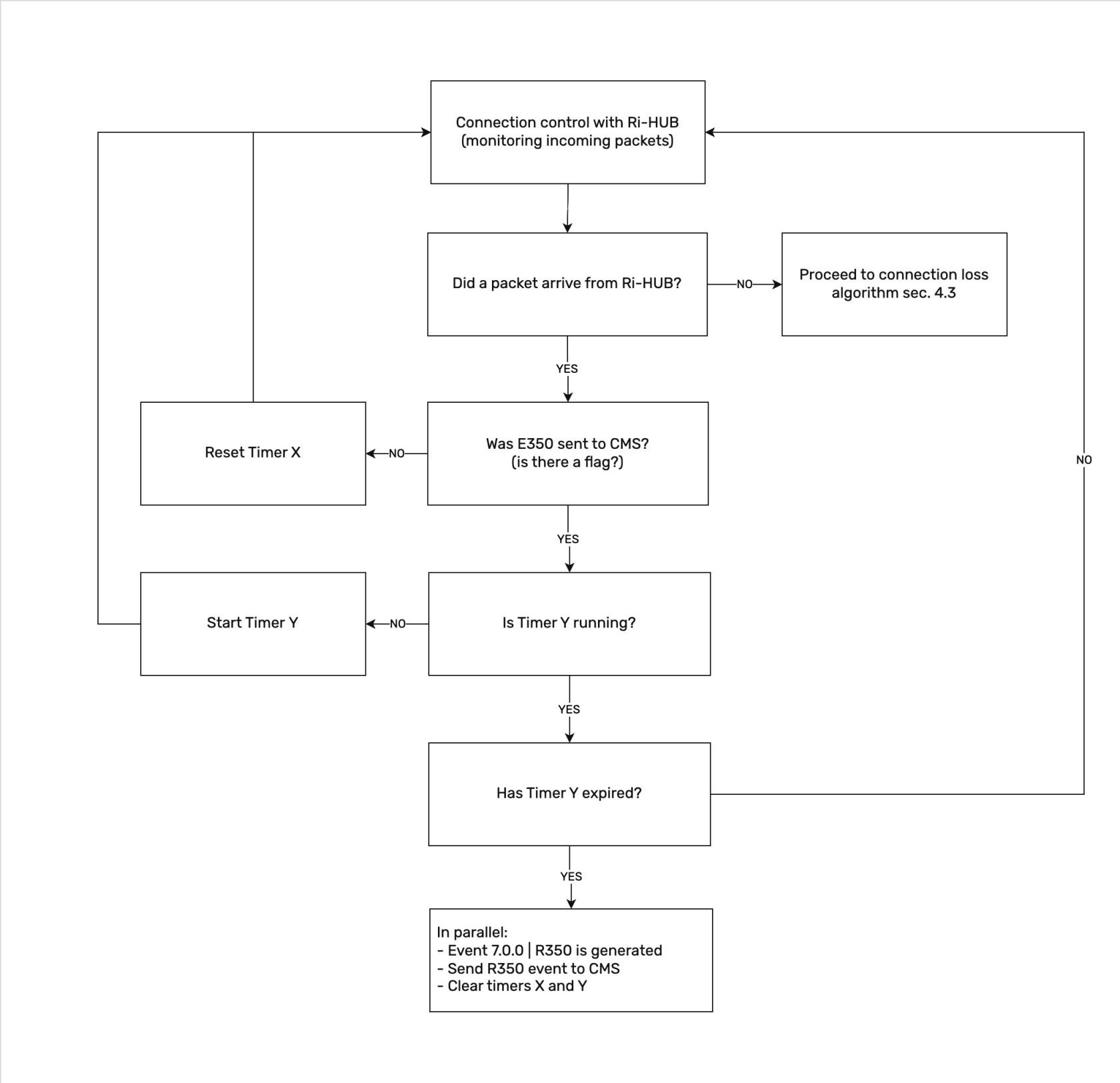
A connection restoration is considered the resumption of packet reception from Ri-HUB and their continuous arrival during the time specified by Timer Y. Only after this is the connection restoration event generated.
Connection control with Ri-HUB is performed on all active communication channels simultaneously. Timer X starts only after connection loss on the last of the available channels.
Example: Ri-HUB is connected via Wi-Fi/Ethernet and SIM card. When the SIM card is disconnected, the connection is maintained via Wi-Fi/Ethernet, the timer does not start. Timer X will start counting only after losing the Wi-Fi connection, when all communication channels are exhausted.
2. Configuring Connection Control Timers with Ri-HUB
Timers are configured in the RiCoder web panel in the Transmission section.
2.1 How to Configure Timers
- Select Transmissions in the side menu
- Select the required transmission from the list
- Click Edit
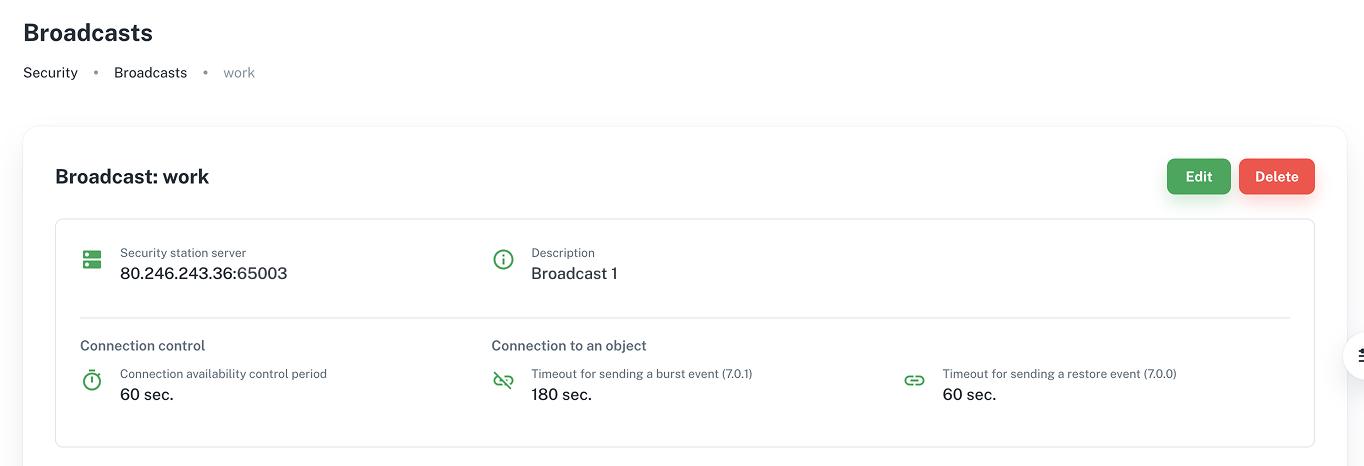
4. Change parameter values:
- Timeout for sending connection loss event (7.0.1)
- Timeout for sending restoration event (7.0.0)
Follow the configuration recommendations in section 6.
5. Click Save in the upper right corner of the screen
2.2 Advantages of Timer Configuration
1. Protection against false triggers
- Timer X ignores short-term network failures, equipment reboots, or temporary interference
- The "HUB link down" event (E350|7.0.1) is generated only during a real prolonged interruption, not with every connection loss to Ri-HUB
2. Stability of restoration events
- Timer Y requires confirmation of a stable connection before sending the "HUB link up" event (R350|7.0.0)
- Frequent events are excluded if the connection is unstable and breaks again. The restoration event is not sent until the channel becomes reliable
3. Reduced load on security organization infrastructure
- Events from Ri-HUB are automatically translated into Surgard protocol codes
- Operators focus on real incidents, not technical network aspects
- The operator understands why and when each event is generated - this simplifies diagnostics
- Using timers allows filtering excessive events about connection loss and restoration from Ri-HUB
3. Event Formation Logic
Ri-HUB generates two types of events:
Parameter | Ademco Code | RiDom Code | Description |
Тimer X | E350 | 7.0.1 | HUB link up |
Тimer Y | R350 | 7.0.0 | HUB link down |
Events are generated strictly according to the specified algorithm and depend on the state of timers X and Y.
For correct integration with CMS, events are transmitted via the Surgard protocol in Ademco codes.
4. Algorithm Operation
Connection control is performed by sending test packets from Ri-HUB to RiCoder with a periodicity of 40s (±5s depending on channel bandwidth). The parameter is not configurable via the interface. In the absence of incoming packets, Timer X starts immediately after missing the first expected packet.
4.1 First Object Connection to Monitoring
The algorithm determines how RiCoder responds to the appearance of the first data packets from Ri-HUB after starting event transmission from Ri-HUB to CMS. The main task at this stage is to record the fact of the device going online without generating false error events.
Prerequisites: In the Application section, the Start Monitoring button is clicked and the hub moved to the Objects section. First online - connecting Ri-HUB to transmission.
4.1.1 Ri-HUB Online
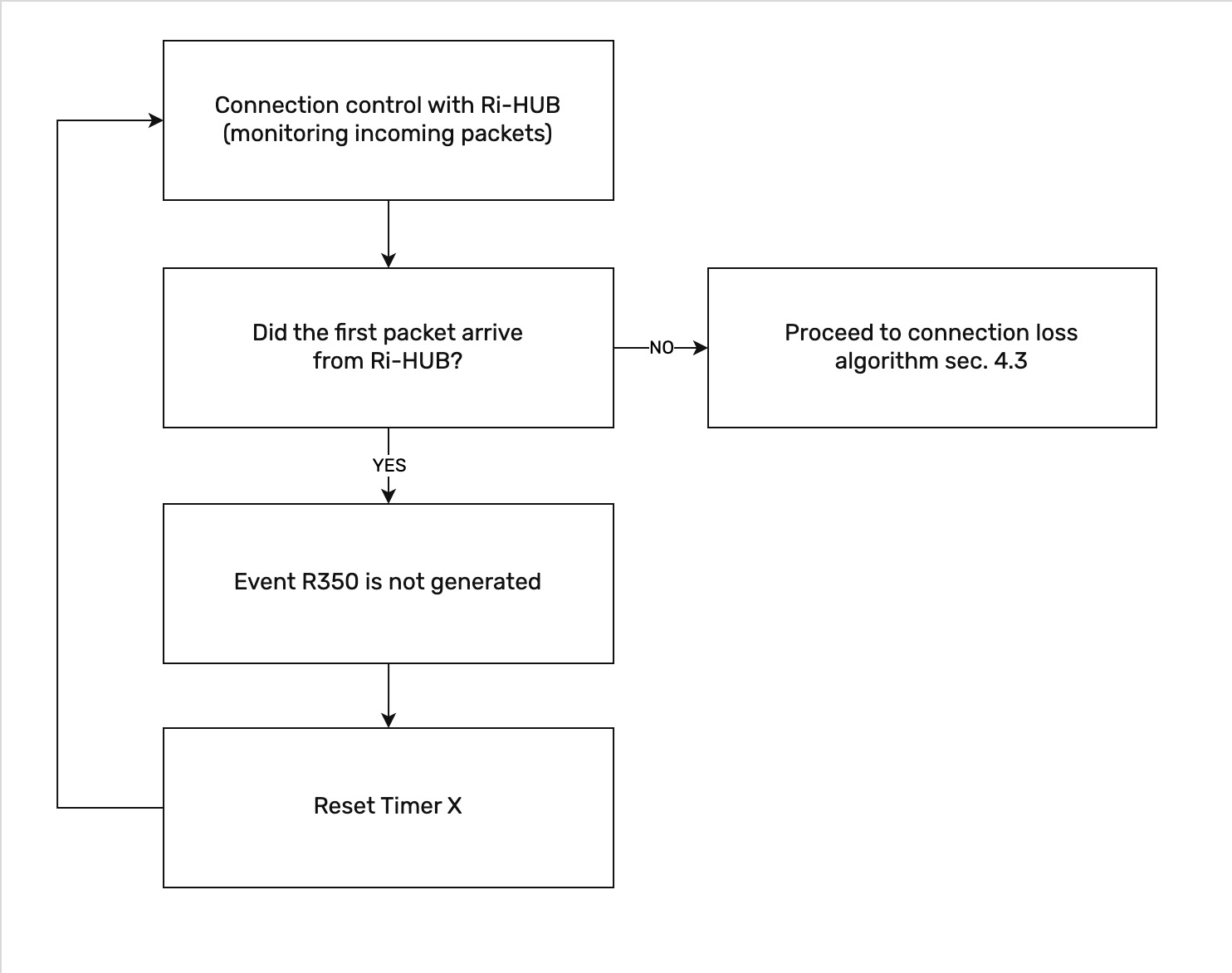
4.1.2 Connection Loss with Ri-HUB
If the first packet did not arrive from Ri-HUB, then transition to the connection loss algorithm is performed (see section 4.3).
4.2 Ri-HUB Online
The algorithm describes the normal operating mode when the Ri-HUB device is successfully connected and transmitting data. RiCoder constantly monitors the presence of incoming packets from Ri-HUB. As long as packets arrive regularly, the connection loss timer (Timer X) is constantly reset, and the system considers the connection stable.
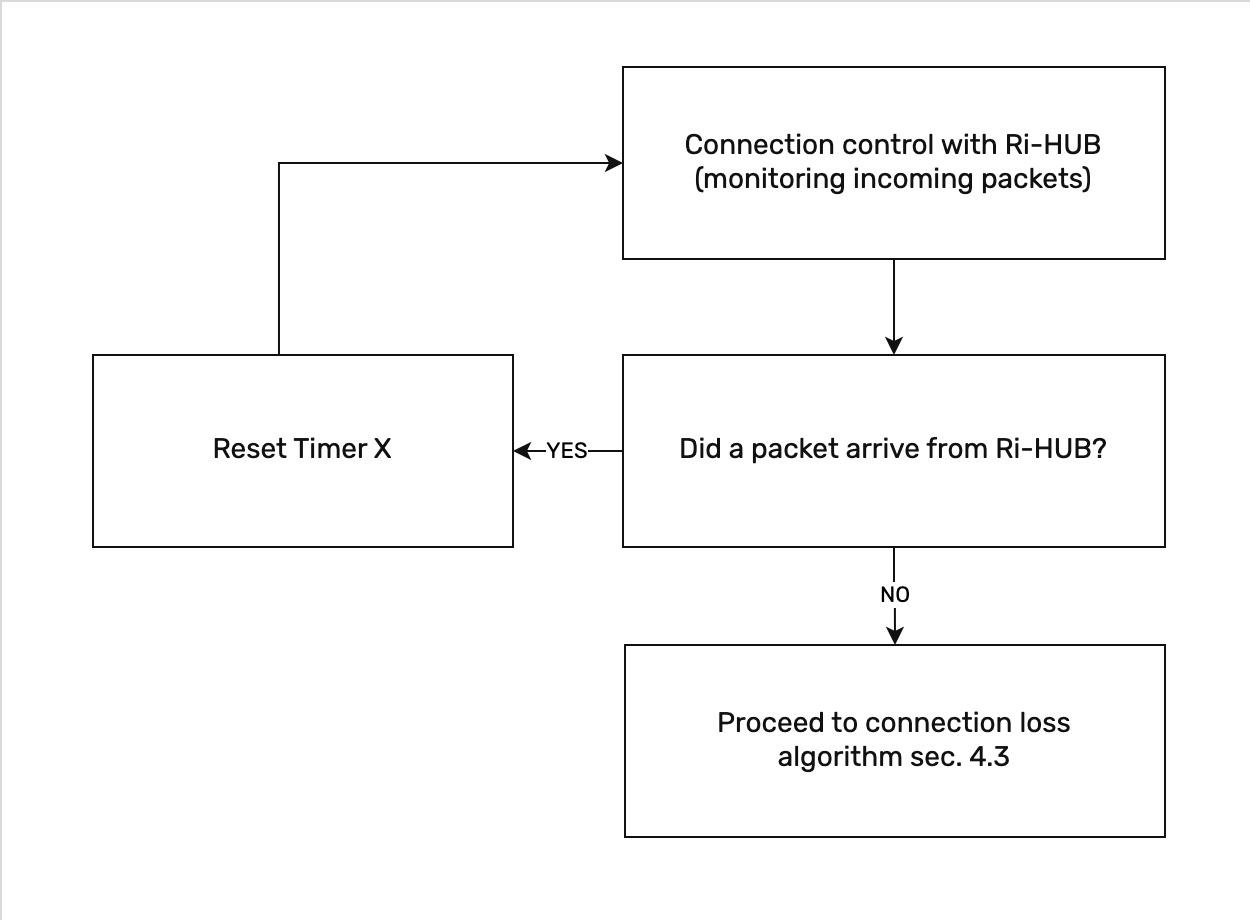
4.3 Connection Loss with Ri-HUB
The algorithm triggers when packets from Ri-HUB stop arriving at RiCoder. In this situation, RiCoder does not generate an alarm instantly - it starts Timer X. The alarm event "HUB link down" (Codes: E350|7.0.1) will be generated and sent to the CMS only if the connection is absent for longer than the time set in Timer X. If the connection is restored before this time expires, the event will not be sent to the CMS.
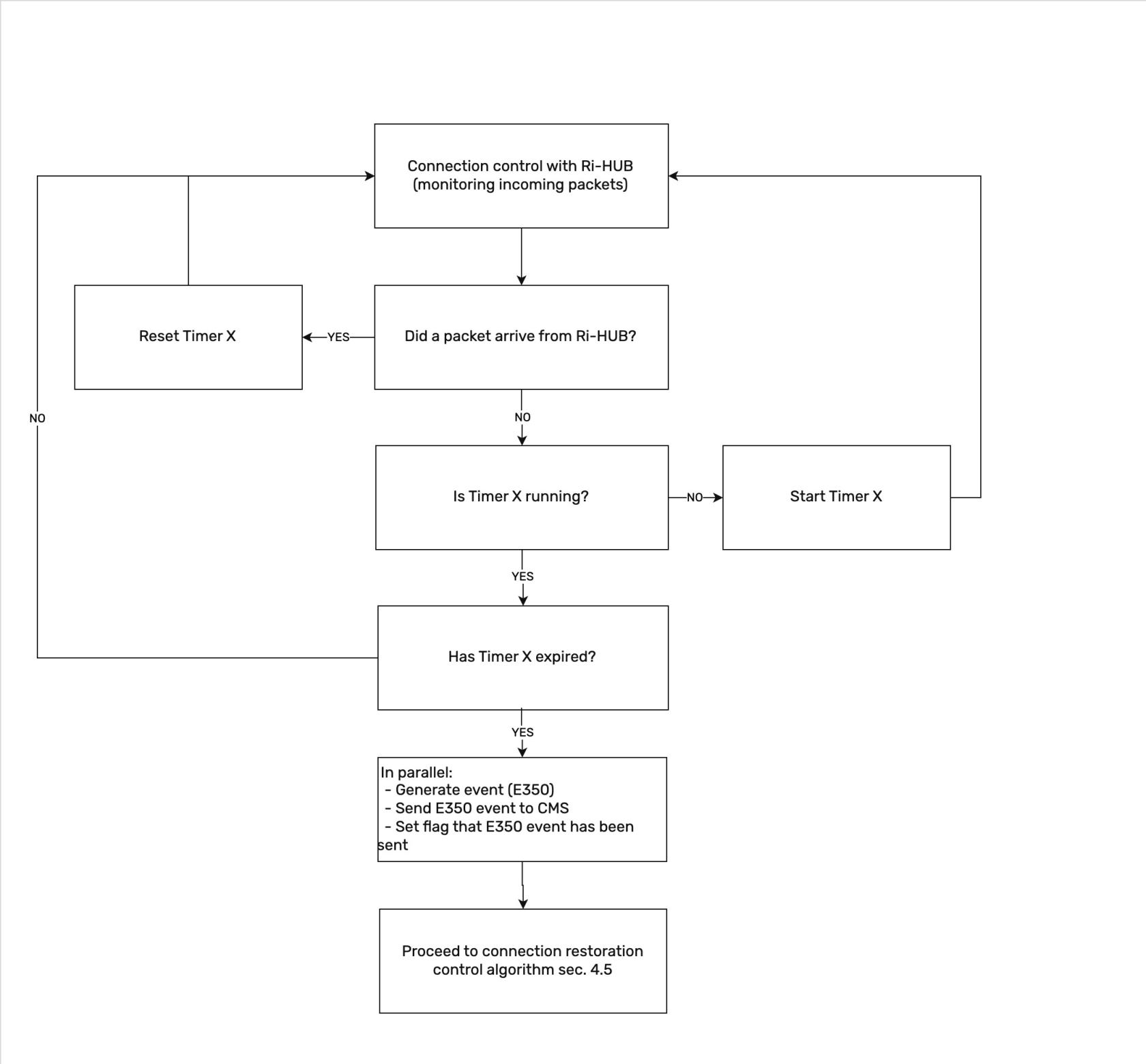
4.4 Connection Restored with Ri-HUB
The algorithm describes the process of confirming that the connection with the device is actually restored. To avoid false triggers when the connection to Ri-HUB appears for a second and disappears again, RiCoder uses Timer Y. The restoration event "HUB link up" (Codes: R350|7.0.0) is generated only if Ri-HUB remains online continuously throughout the entire Timer Y operation time.
5. Special Timer Operation Modes
The section describes RiCoder behavior in non-standard situations: during initial startup, RiCoder server reboot, changing timer settings to zero values, and manually disabling the object. These algorithms guarantee that the system correctly processes events even during system failures and configuration changes, without losing information about the current connection status.
5.1 Initial RiCoder Startup
A situation when RiCoder is first deployed in a Security Organization and does not yet have an event history. In this case, RiCoder operates according to the standard first connection algorithm (see section 4.1). Timers start in normal mode, waiting for the first packet from Ri-HUB.
5.2 RiCoder Restart
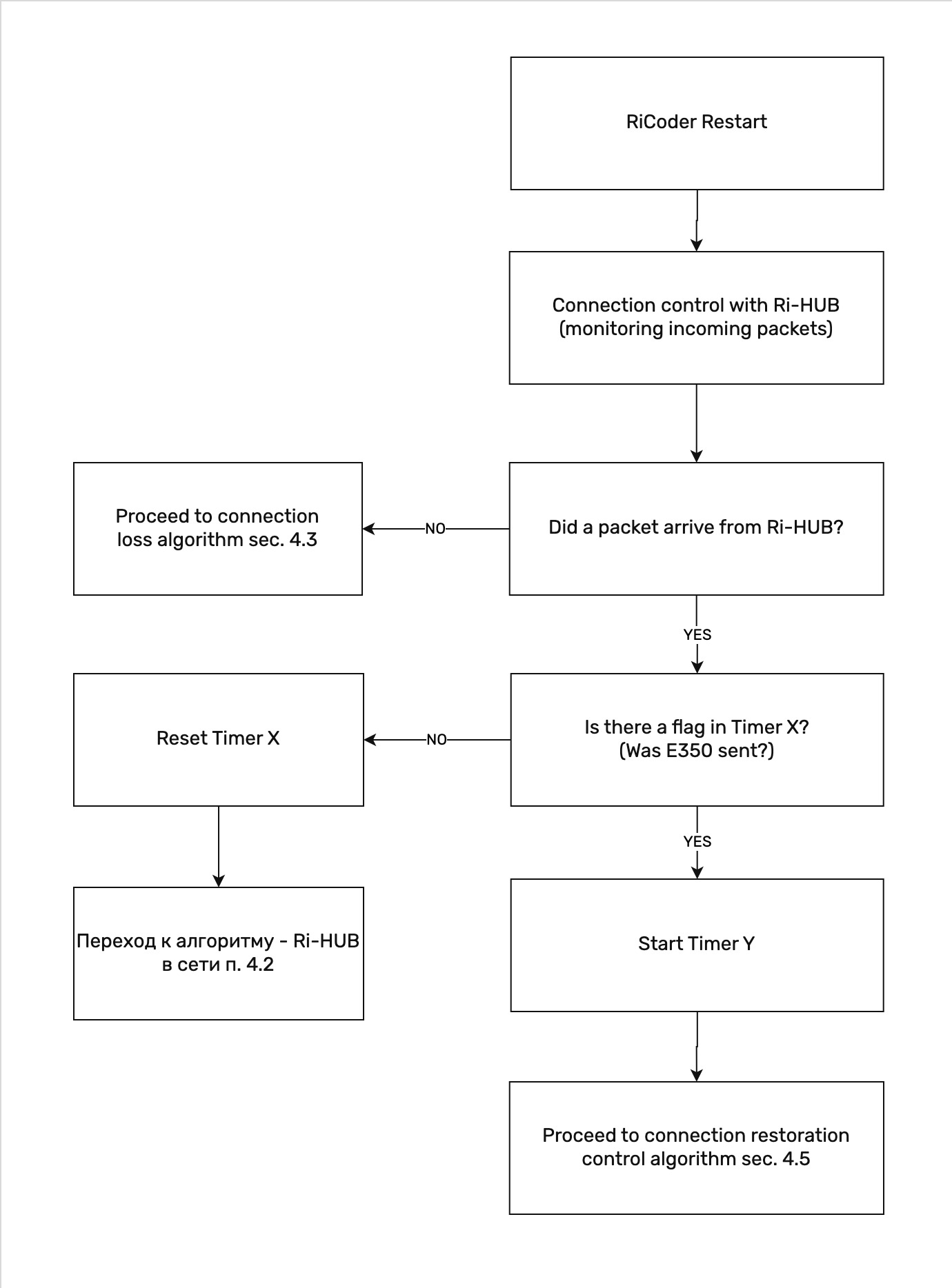
The algorithm ensures continuity of timer states when rebooting the RiCoder security server. RiCoder saves information about whether a connection loss with Ri-HUB was recorded (event: "HUB link down") before the reboot.
Key logic:
- If there was a connection loss with Ri-HUB before reboot (event E350 was generated and sent to CMS), then after the connection appears, RiCoder will start Timer Y to confirm stability, and only then generate the restoration event (R350)
- If there was no "HUB link down" event before reboot, RiCoder will continue standard connection control with Ri-HUB, resetting Timer X
- Timers X and Y are not forcibly reset on restart, preserving the connection context
5.3 Mode "Timer Y = 0 sec"
The mode is designed for situations requiring instant response to connection restoration, without waiting for communication channel stabilization.
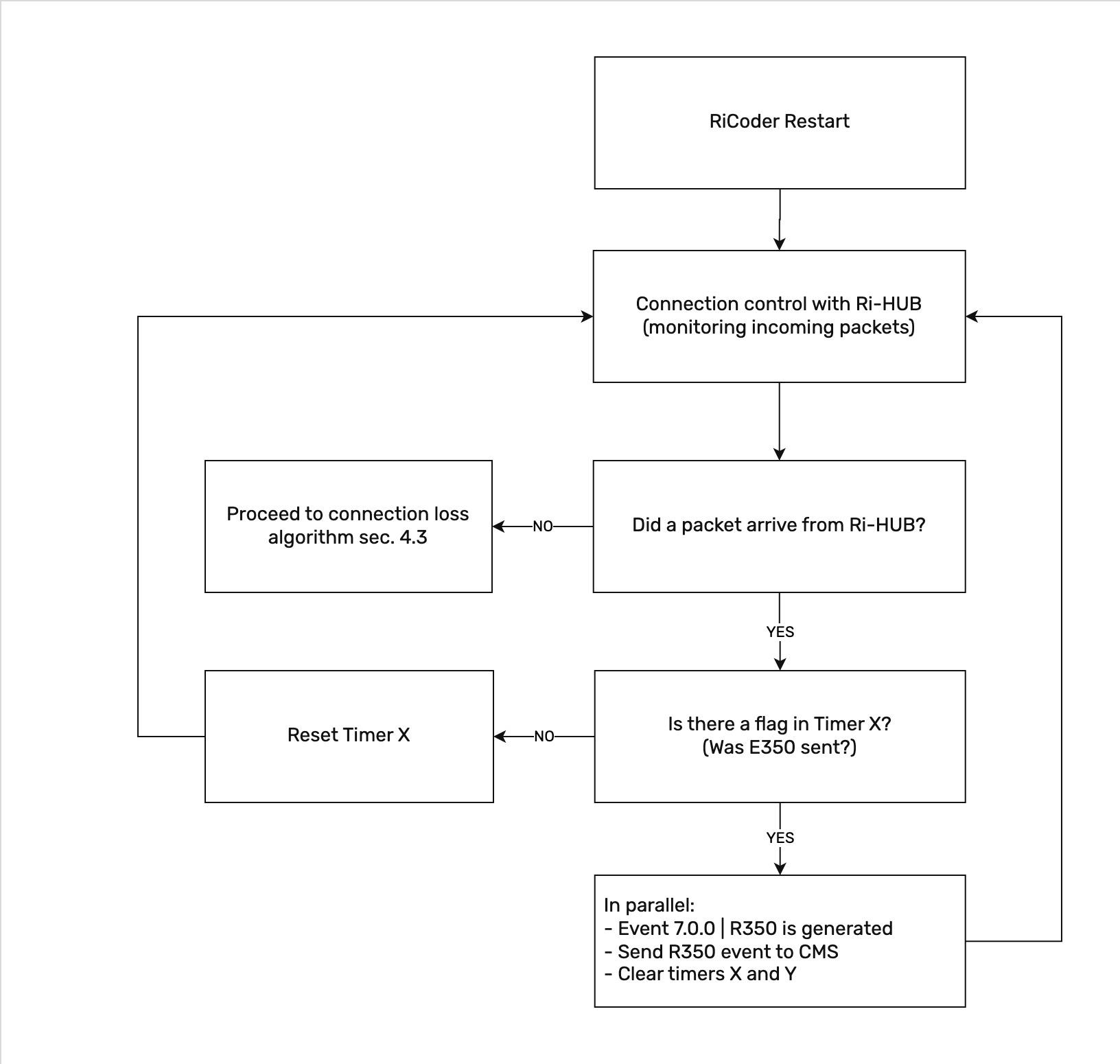
If the value Y = 0 is set in the settings, the connection restoration event "HUB link up" (R350) is generated immediately as soon as the first packet arrives from Ri-HUB.
Important: Instant event generation occurs only if a connection loss event "HUB link down" (E350) was previously recorded. This prevents the generation of false "HUB link up" events (R350) if the object was already online.
5.4 Object Disabled from Monitoring
When disabling Ri-HUB from monitoring, all active timers X and Y are forcibly reset, and accumulated statuses are cleared. When this Ri-HUB is next connected to RiCoder, the timers start again according to the standard algorithm (see section 4.1).
5.5 Docker Container Restart
Frequent restarts of RiCoder containers may result in missed events related to connection loss with a hub.
Situation:
If a connection to one of the Ri-HUB devices is lost during container restart, the status of the disconnected hub will be lost after the system reloads.
Example:
- Before the restart, 3 Ri-HUB devices were displayed in the system
- During the container restart, one Ri-HUB lost its connection
- After the restart, RiCoder detects only 2 active Ri-HUB devices
Recommendation: After a scheduled container restart, verify the current list of connected Ri-HUB devices in the Objects section and re-add any disconnected devices if necessary.
6. Monitoring Ri-HUB Connection in Web Panel
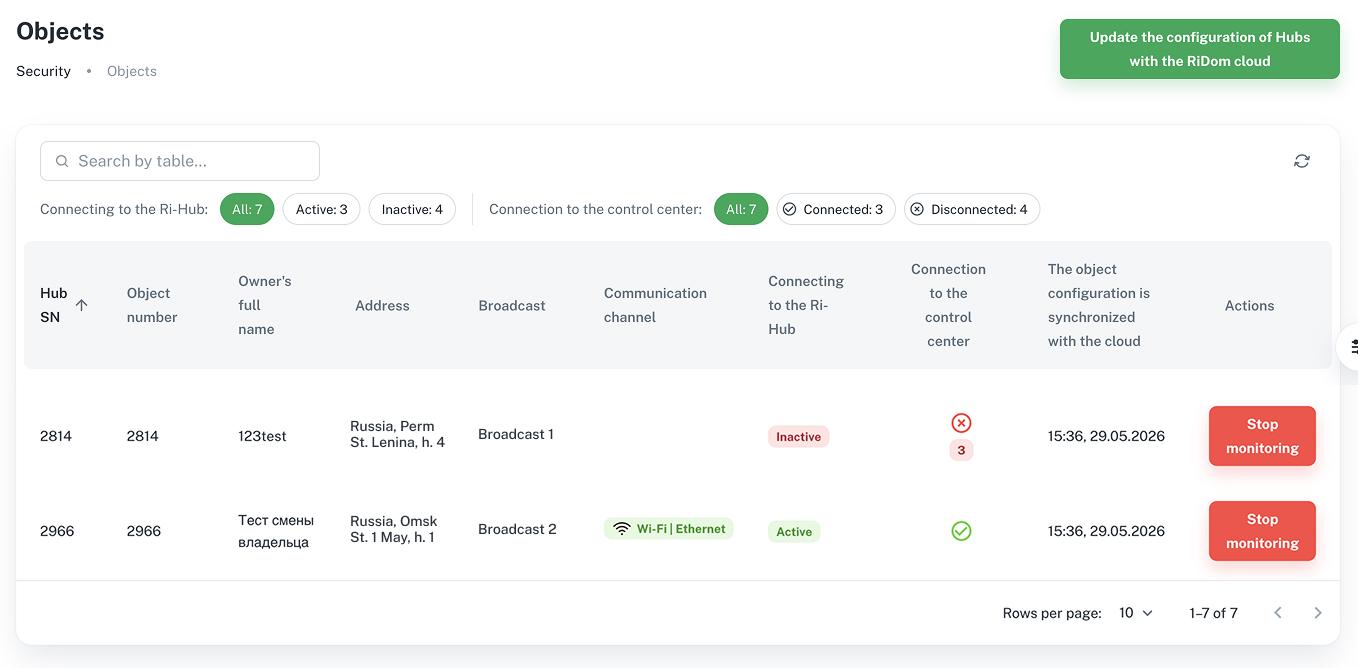
Monitoring Ri-HUB connection is performed in the Objects section in the "Connection to Hub" column.
First connection:
Ri-HUB connected to RiCoder (RiCoder received the first packet from Ri-HUB), Ri-HUB status changes to "Active" and displays which channel is active.
Second test packet not received within 40 sec:
Timer X is started and the status in the interface is "Inactive". As soon as Timer X starts, the status in the interface immediately changes from "Active" to "Inactive", while event E350 is NOT generated.
If a packet arrives from Ri-HUB before Timer X expires:
The UI status changes from "Inactive" to "Active", Timer X is reset.
Example:
Maximum Timer X value is set = 300 sec (5 min). If no packets are received from Ri-HUB (test and data) within 1 min, the status in the interface will be "Inactive". At the same time, event E350 will be sent to the CMS only after 300 sec of Timer X operation.
7.1 Timer Configuration Rules
- Do not reduce Timer X value below 60 seconds without necessity. Short-term network delays or equipment reboots can lead to false connection loss events.
- Use Y = 0 mode with caution. Instant restoration recording is useful for critical objects, but with an unstable communication channel, RiCoder can generate multiple identical events and rapid alternation of events in CMS: "HUB link down" and "HUB link up", creating information noise and complicating dispatcher work.
- When changing timer parameters in the RiCoder web panel, changes are applied immediately after saving the configuration.
Important: New setting values take effect for the next check cycle.
If timer settings are changed while Ri-HUB has already lost connection (Timer Y is running), the current countdown is NOT interrupted or recalculated. The timer continues to completion according to the old value, and the restoration event (R350) will be sent according to the settings that were active at the start of the countdown.
Example:
- Ri-HUB lost connection, loss timer triggered (E350). Restoration timer Y = 60 sec started
- After 30 seconds, the operator changes Y = 30 sec in the web panel settings
- Result: Timer Y will continue counting to 60 seconds (according to the old value). Event R350 will arrive 60 seconds after connection loss. The value of 30 sec will apply only on the next connection loss.
7.2 Flexible Configuration by Object
Each monitoring object has its own characteristics: communication channel quality, degree of importance, technical placement conditions. The table below presents typical scenarios and corresponding recommendations for configuring timers X and Y.
Object Characteristics | Recommendation |
Stable communication channel | Reduce X and Y values for faster response |
Unstable communication channel (3G/4G, remote objects) | Use maximum timer values (X = 300 sec, Y = 60 sec) |
Critical objects where instant response is important | Set Y = 0 for instant restoration recording |
Non-critical, remote objects | Use maximum timer values (X = 300 sec, Y = 60 sec) |
Objects with backup communication channel | Set Y=10-20 sec for quick recording of switching to main channel after failure |
Objects in areas with power interruptions | Increase X to 180-300 sec to avoid false alarms during equipment reboot |
Objects with high event traffic | Use maximum Timer Y value = 60 sec to reduce CMS load |
Objects with GSM channel in roaming | Increase X to 180-300 sec due to possible connection instability and roaming delays |
If the object does not fit any of the listed scenarios, start with maximum timer X and Y settings and adjust them based on analysis of incoming events during 1-2 weeks of RiCoder operation.
Updated May 29, 2026
No comments to display
No comments to display