
Analysis of RiCoder container logs
To analyze the situation in which events do not reach the monitoring station, you need to look at the logs of the following containers:
- chop_deploy-eqgateway-1 - receiving, processing, transmitting events from Ri-HUB to the queue.
- chop_deploy-surgard-1 - receiving events from the queue, matching ADEMCO codes, transmission to the monitoring station.
1. Where are the container logs?
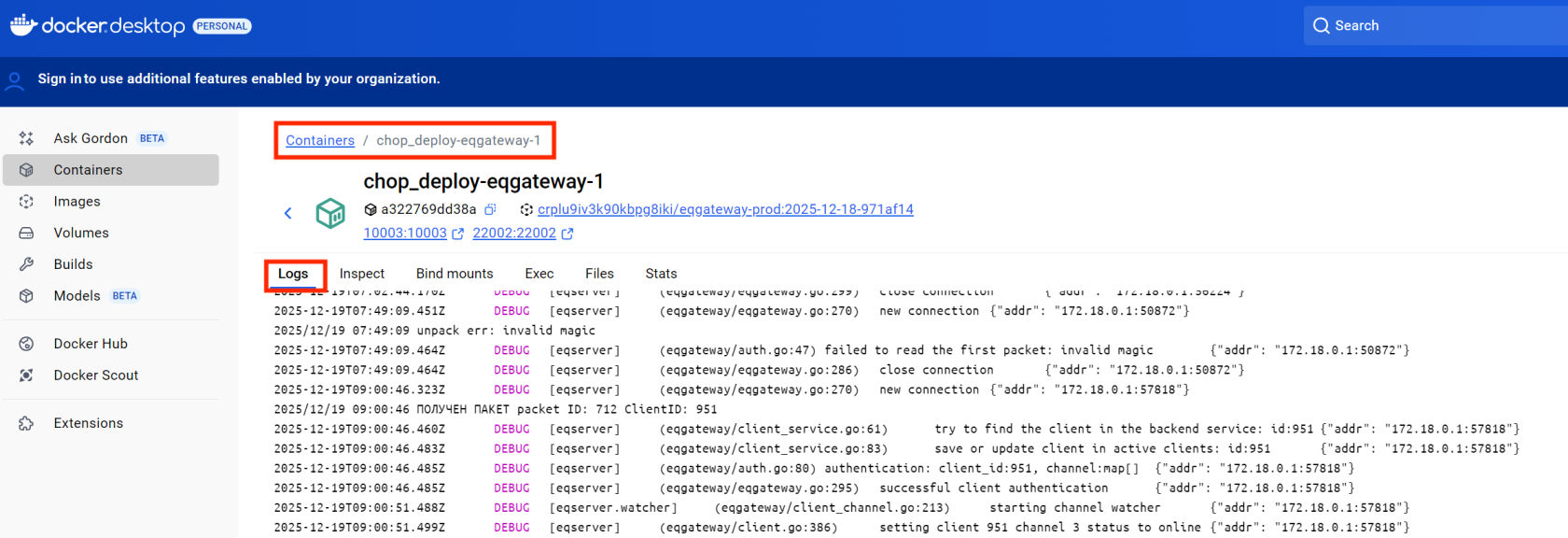
1.1. On Docker Desktop
1. Open Docker Desktop.
2. Go to the Containers tab.
3. Select the desired container.
4. Select the Logs tab.
Docker Screen: Logs Tab
1.2. In the console (for Linux / Windows)
1. In the console, enter the command to view the logs of a specific container.
docker logs <container name>whereis the name of the desired container:
- chop_deploy-surgard-1
- chop_deploy-eqgateway-1
The command will return all available logs starting from the moment the container was launched.
If the container is stopped, its logs remain available - they are not automatically deleted when stopped.
Useful commands for convenient viewing of logs:
# View logs in real time
docker logs -f <container_name>
2. Log structure
Example:
2025-12-11T10:52:38.412Z DEBUG [eqserver] (eqgateway/client_service.go:61) try to find the client in the backend service: id:212 {"addr": "217.66.157.83:30962"}Here:
- Date and time in ISO 8601 format (
2025-12-11T10:52:38.412Z), Z - zero time zone, .412Z - milliseconds; - Severity level:
ERROR,WARN,INFO,DEBUG; - Log source: "[eqserver] (eqgateway/client_service.go:61)" - eqgqteway container and the corresponding processing function;
- Error messageor informational message;
- Context: "{“adr”:“217.66.157.83:26127”}" - connection address.
The time in the logs is indicated in Greenwich Mean Time - UTC+0.
Container logs are written frequently for each event associated with the connected control centers (Ri-HUB) to RiCoder. To accurately identify messages related to a specific device, use the ClientID that is assigned to each Ri-HUB.
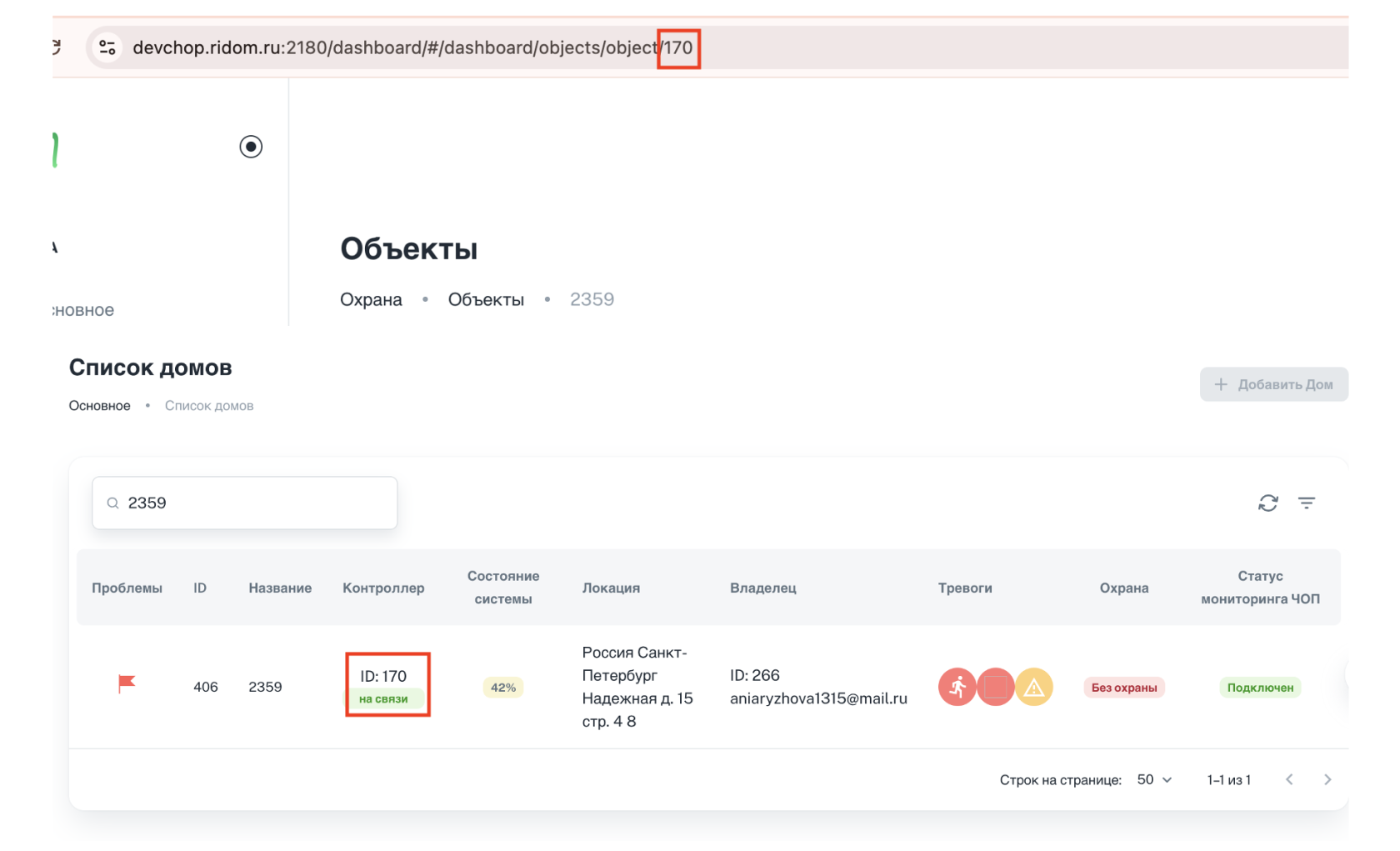
Where can I see the Ri-HUB identifier (ClientID) in the interface?
ClientID - Ri-HUB identifier.
1. In the RiCoder web panel, open the section Objects.
2. Option 1. Column Controller in the list of houses displays ClientID.
3. Option 2. In the address bar of the browser at the end of the line there is a number - ClientID.
RiCoder Screen: Objects
3. Container logs eqgateway-1
This section describes typical operating scenarios for the eqgateway-1 container, which is responsible for receiving and broadcasting events from the Ri-HUB control center to the RiCoder software. Normal operating modes and possible communication failures are described, indicating the reasons, statuses in the interface and system behavior during recovery.
3.1. Receiving test messages from Ri-HUB
Container eqgateway-1 successfully receives a test message from Ri-HUB, the connection between Ri-HUB and RiCoder is established, the status of Ri-HUB in the RiCoder web panel is - Active. Normal operation of the communication autotest between Ri-HUB and RiCoder.
Table with transcript of log text
№ | Time | Text of the log line | What does it mean? |
1 | 2025-12-11T10:51:38 | PACKET RECEIVED packetID: 1731 ClientID: 170 | The container received some kind of package from Ri-HUB (170). packetID - package identifier, generated in Ri-HUB ClientID - Ri-HUB identifier. View ClientID in the interface. |
2 | 2025-12-11T10:51:38 | Resetting the timer | The communication monitoring timer between Ri-HUB (170) and RiCoder is reset immediately. The timer is reset whenever any packet arrives (PacketType: 0 or 2). The timer is reset for a specific connection. Each Channel has a separate timer. Timer operation 1. A packet arrived with PacketType: 0 -> timer reset 2. A packet arrived with PacketType: 2 -> timer reset 3. No packets with PacketType: 0 or 2 in the set period -> timer reset -> status in UI “Not active” |
3 | 2025-12-11T10:51:38.788Z | Packet arrived ClientID: 170, PacketType: 0, Channel: 2 | The container identified that a test message was received from Ri-HUB (170) via the GPS channel. PacketType 0 - communication check 2 - message, any other than communication check There are no other values, either 0 or 2. Channel 2 - SIM 3 – WI-FI / Ethernet There are no other values, either 2 or 3. |
Screenshot of the log

3.2. Establishing/updating connection with Ri-HUB
The container successfully establishes a connection to Ri-HUB, the state of Ri-HUB in the RiCoder web panel is Active. The connection is registered, Ri-HUB receives the right to exchange messages with RiCoder. Normal operation when connecting.
Table with transcript of log text
Authentication messages are output simultaneously and are displayed in a group of 4 lines.
№ | Time | Text of the log line | What does it mean? |
1 | 2025-12-11T10:52:38.412Z | PACKET RECEIVED packet ID: 873 ClientID: 212 | The container received some kind of package from Ri-HUB (212). packetID - package identifier, generated in Ri-HUB ClientID - Ri-HUB identifier. View ClientID in the interface. The package from Ri-HUB has been delivered. |
2 | 2025-12-11T10:52:38.412Z | try to find the client in the backend service: id:212 | The cotainer function tries to find a record of Ri-HUB with id 212. This is the start of the session installation/update process. |
3 | 2025-12-11T10:52:38.421Z | save or update client in active clients: id:212 | Connection successfully established and registered. |
4 | 2025-12-11T10:52:38.421Z | authentication: client_id:212, channel:map[] | Start the authentication procedure. After successful authentication, Ri-HUB is authorized to send/receive messages. channel:map[] - the communication channel has not yet been assigned. |
5 | 2025-12-11T10:52:38.421Z | successful client authentication | Ri-HUB authentication completed successfully. |
If authentication fails and the connection is not established, then after the 4th line there will be no messages from Ri-HUB (id: 212) to the SIM channel (2). It is possible that messages will arrive via Wi-Fi/Ethernet channel (3) if channels have been switched in Ri-HUB.
Screenshot of the log

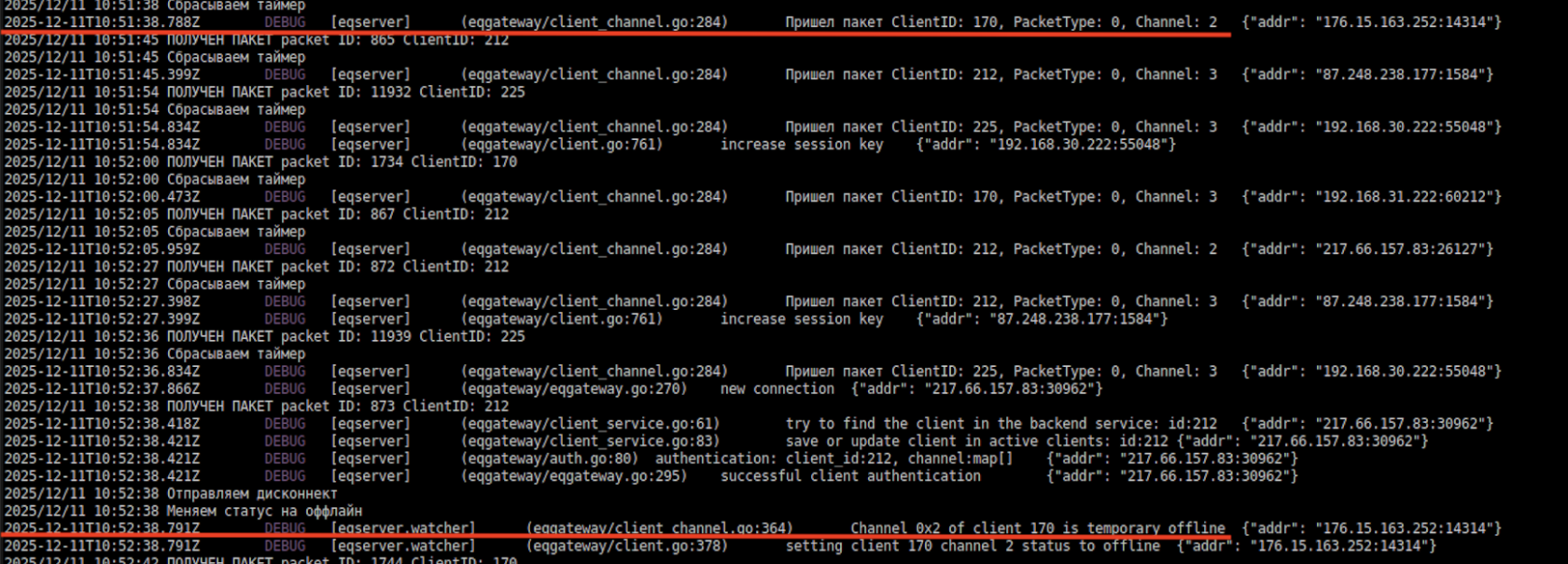
3.3. Ri-HUB hasn't been in touch for a long time
Container eqgateway-1 detects a lack of communication with Ri-HUB: the communication control timeout has been exceeded, Ri-HUB has not been in touch for a long time. The status of Ri-HUB in the RiCoder web panel is not Active. The connection is broken, the SIM channel is transferred to the internal "offline" state.
- Timeout for sending break event (7.0.1)
- Timeout for sending recovery event (7.0.0)
View timeout settings in the interface.
Table with transcript of log text
№ | Time | Text of the log line | What does it mean? |
1 | 2025-12-11T10:51:38 | Packet arrived ClientID: 170, PacketType: 0, Channel: 2 | The container received the last packet with a test message from Ri-HUB (170) via the SIM channel. Control of connection availability. |
2 | 2025-12-11T10:52:38 | Sending a disconnect | Timer triggered - timeout time exceeded. Packets with PacketType: 0 did not arrive for more than 1 minute. The timeout for sending the break event (7.0.1) in the UI is set to 60 seconds for Ri-HUB (170). The status is sent to the eqgateway container function. |
3 | 2025-12-11T10:52:38 | Change the status to offline | Changing the status in the eqgateway container function. |
4 | 2025-12-11T10:52:38 | Channel 0x2 of client 170 is temporary offline | Push notifications were sent to the MP and to the RiCoder web panel that Ri-HUB is offline via the SIM channel. |
5 | 2025-12-11T10:52:38 | setting client 170 channel 2 status to offline | Updating the internal status of channel 2 (SIM) of Ri-HUB (id: 170) to “offline” in the connection management function. |
Screenshot of logs
3.4. Failed to establish connection with Ri-HUB via one of the communication channels
The eqgateway-1 container received a packet from Ri-HUB via the SIM channel, but the connection was terminated abnormally: the remote side reset the TCP connection. The Ri-HUB status in the RiCoder web panel may temporarily change to not Active, but this is not a system error - the connection may be restored automatically.
Table with transcript of log text via SIM channel
№ | Time | Text of the log line | What does it mean? |
1 | 2025-12-11 10:52:51 | PACKET RECEIVED packetID: 875 ClientID: 212 | The container received some kind of package from Ri-HUB (212). |
2 | 2025-12-11 10:53:01 | Resetting the timer | The communication monitoring timer between Ri-HUB (212) and RiCoder is reset immediately. |
3 | 2025-12-11 10:53:01 | Packet arrived ClientID: 212, PacketType: 0, Channel: 2 | The container identified that a test message was received from Ri-HUB (212) via the channel SIM. |
4 | 2025-12-11 10:53:01 | unpack err: read tcp 172.18.0.7:10003 -> 217.66.157.83:26127: read connection reset by peer | Disconnection of remote connection. The remote side (IP: 217.66.157.83) abnormally closed the TCP connection at the moment when the function inside the eqgateway container (IP 172.18.0.7) ptried to read data from a previously established connection. |
5 | 2025-12-11 10:53:01 | network error while reading (expected), by client: 212 err: read tcp 172.18.0.7:10003 -> 217.66.157.83:26127: read connection reset by peer | Information message from the container about the connection being broken. This is not RiCoder's fault. Sometimes the connection may be broken, but then restored. If the connection can be restored or reconnected during the communication control period, this will not affect the operation of the broadcast in any way. |
Screenshot of logs
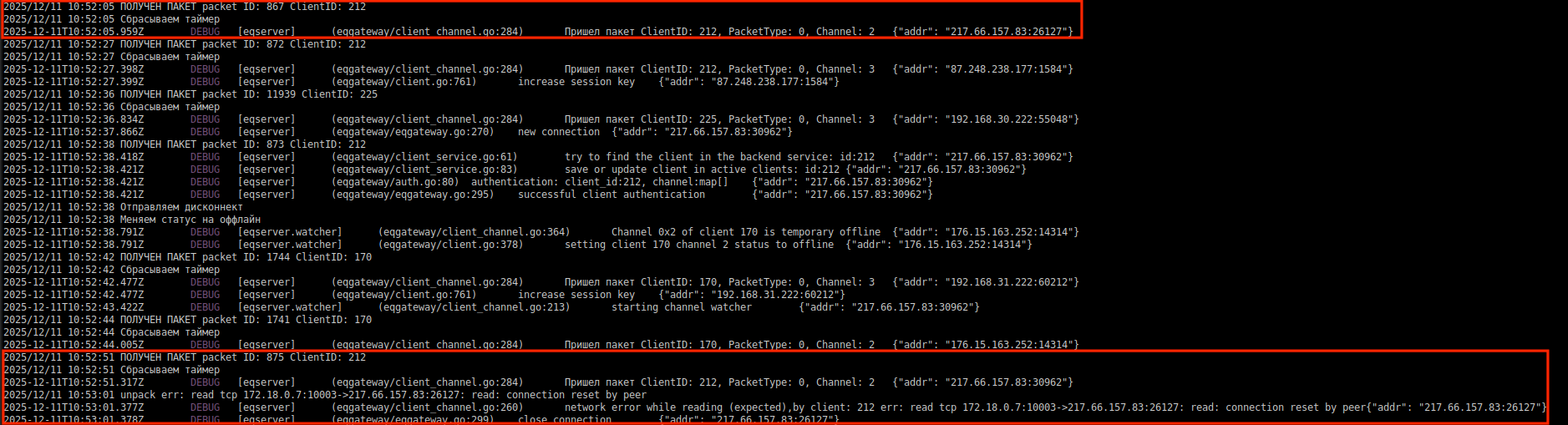
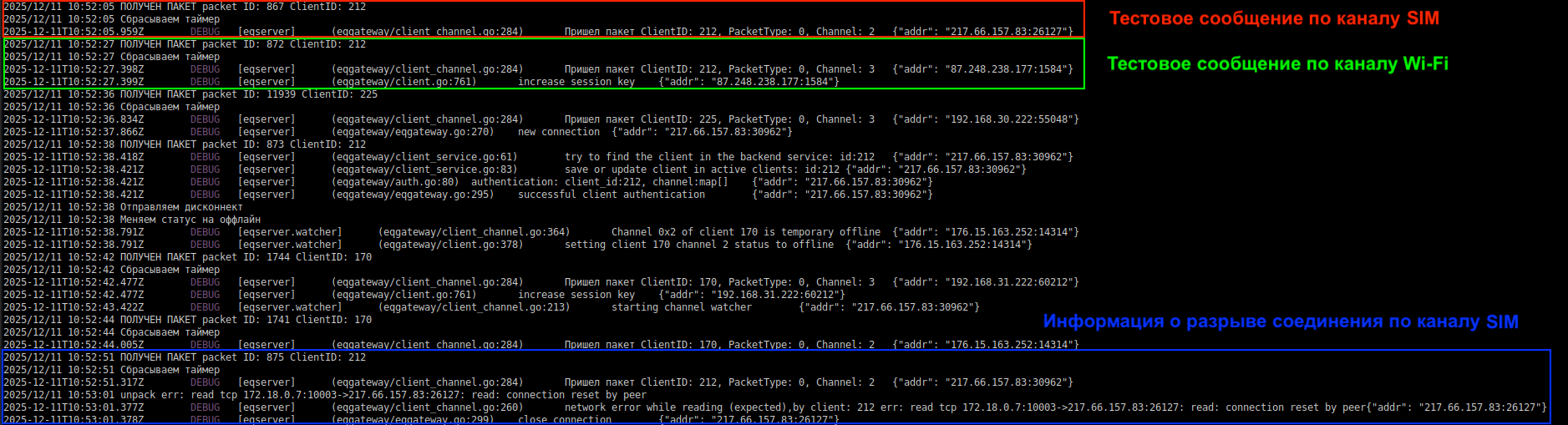
3.5. Switching communication channels from SIM to Wi-Fi
Container eqgateway-1 records the Ri-HUB switching from the SIM channel to Wi-Fi - packets arrive on both channels, the timers are reset. The state of Ri-HUB in the RiCoder web panel remains - Active. The container correctly handles the change of communication channel.
Table with transcript of log text
№ | Time | Text of the log line | What does it mean? | Channel |
1 | 2025-12-11 10:52:05 | PACKET RECEIVED packetID: 867 ClientID: 212 | The container received some kind of package from Ri-HUB (212). | SIM |
2 | 2025-12-11 10:52:05 | Resetting the timer | The communication monitoring timer between Ri-HUB (212) and RiCoder is reset. | SIM |
3 | 2025-12-11 10:52:05 | Packet arrived ClientID: 212, PacketType: 0, Channel: 2 | The container identified that a test message was received from Ri-HUB (212) via the SIM channel. | SIM |
Connection occurred in Ri-HUB | to Wi-Fi and disconnection via SIM channel. | |||
4 | 2025-12-11 10:52:27 | PACKET RECEIVED packetID: 867 ClientID: 212 | The container received some kind of package from Ri-HUB (212). | Wi-Fi |
5 | 2025-12-11 10:53:27.398Z | Resetting the timer | The communication monitoring timer between Ri-HUB (212) and RiCoder is reset immediately. | Wi-Fi |
6 | 2025-12-11 10:53:27.399Z | Packet arrived ClientID: 212, PacketType: 0, Channel: 2 | The container identified that a test message was received from Ri-HUB (212) via the Wi-Fi channel. | Wi-Fi |
7 | 2025-12-11 10:52:51 | PACKET RECEIVED packetID: 875 ClientID: 212 | The container received some kind of package from Ri-HUB (212). | SIM |
8 | 2025-12-11 10:52:51.317Z | Resetting the timer | The communication monitoring timer between Ri-HUB (212) and RiCoder is reset immediately. | SIM |
9 | 2025-12-11 10:52:51 | Packet arrived ClientID: 212, PacketType: 0, Channel: 2 | The container identified that a test message was received from Ri-HUB (212) via the SIM channel. | SIM |
10 | 2025-12-11 10:53:01.377Z | unpack err: read tcp 172.18.0.7:10003 -> 217.66.157.83:26127: read connection reset by peer | Disconnection of remote connection. | SIM |
11 | 2025-12-11 10:53:01.378Z | network error while reading (expected), by client: 212 err: read tcp 172.18.0.7:10003 -> 217.66.157.83:26127: read connection reset by peer | Information message from the container about the disconnection of the connection for Ri-HUB (212) via the SIM channel. | SIM |
Screenshot of logs
3.6. Receiving a message with data from Ri-HUB
The eqgateway-1 container successfully receives a data packet from Ri-HUB via one of the communication channels, the connection is active, the status in the RiCoder web panel is Active. The packet is decrypted and transferred to the processing queue for further broadcast to the surgard-1 container. Normal operation when transmitting events from Ri-HUB.
Table with transcript of log text
№ | Time | Text of the log line | What does it mean? |
1 | 2025-12-11 10:53:01 | PACKET RECEIVED packetID: 1073741918 ClientID: 170 | packetID - package identifier, generated in Ri-HUB ClientID - Ri-HUB identifier. View ClientID in the interface. The package from Ri-HUB has been delivered. |
2 | 2025-12-11 10:53:01 | Resetting the timer | The communication monitoring timer between Ri-HUB (212) and RiCoder is reset immediately. |
3 | 2025-12-11 10:53:01 | Packet arrived ClientID: 170, PacketType: 2, Channel: 3 | A packet arrived via the wi-fi channel. |
4 | 2025-12-11 10:53:01 | New data message. Packet ID: 1073741918, magic: 228. Message: rpcprotocol.MessageEventECP{ClientID:0x7397, Time: 0x693aa28c, Code:0x70101, Address:0x0, SubAddress:0x0, Channel:0x0, Params:[]uint8(nil)} | Converting a package from binary to text format. MessageEventECP - generated in Ri-HUB |
5 | 2025-12-11 10:53:01 | Send the package with messageID: 29591 | The packet is decrypted in eqgatteway and sent to the message queue container rabbitmq -1 |
Screenshot of logs

3.7. Analysis of event loss by Message ID
Message ID is the message sequence number assigned by Ri-HUB when it was sent. Each message from the device has its own unique identifier, which allows you to track the transmission sequence.
Using Message ID you can:
- Determine which messages did not reach the eqgateway-1 container. For example, if there are gaps in the sequence.
- Identify delays or data loss during the transmission phase.
Example:
Messages with Message ID: 100, 101, then 104 were received.
This means that messages 102 and 103 were not delivered.
This situation may arise if:
- Messages were delayed in the queue inside Ri-HUB;
- Lost during transmission between the device and the eqgateway container;
- Were delayed in the processing queue inside the container.
4. Container logs surgard-1
4.1. Normal operation
Container surgard-1 successfully receives and processes a message from message queue (rabbitmq-1 container), encrypts and sends to the monitoring station. The connection between RiCoder and the monitoring station is confirmed, the status of the monitoring station server in the RiCoder web panel is Connection established.
Conditions for normal operation of event broadcasting:
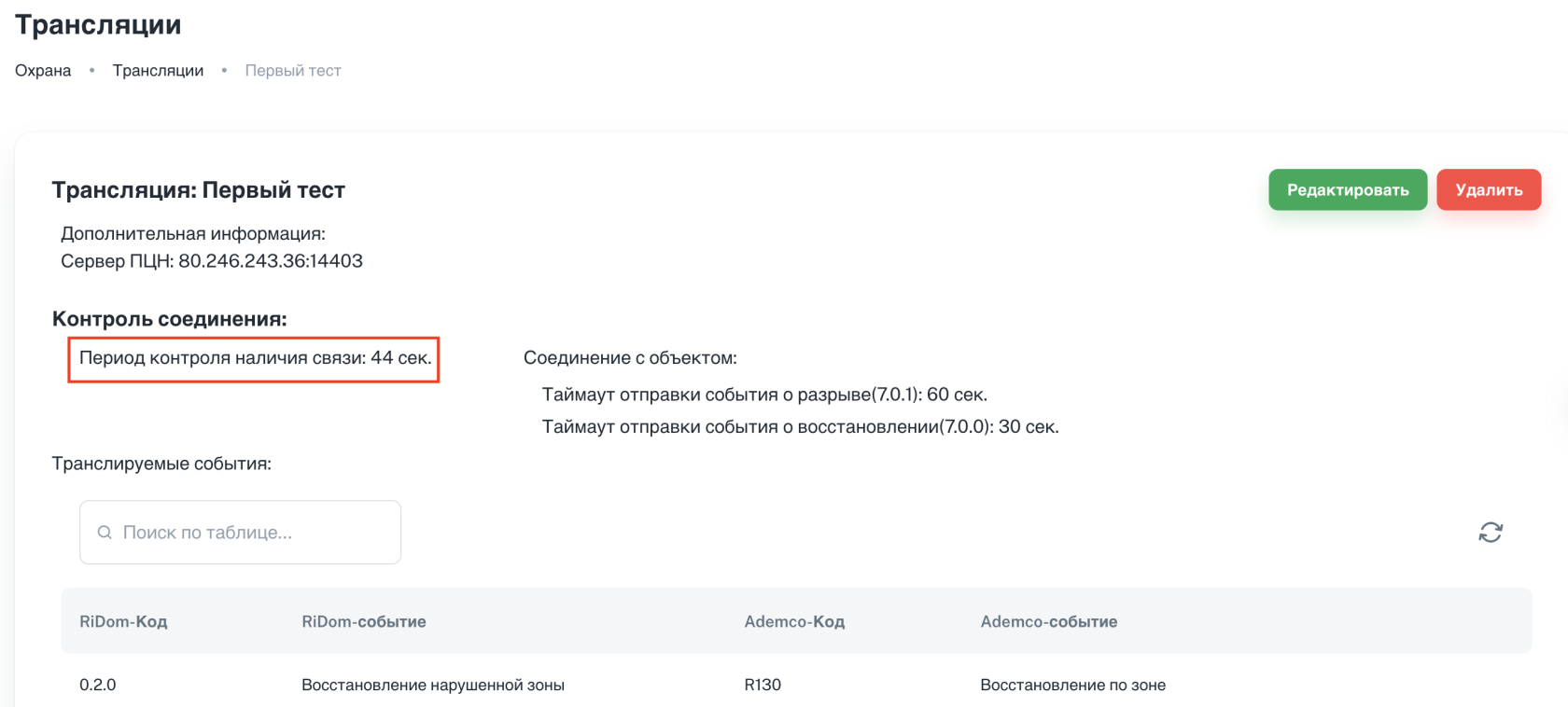
1. Test messages are sent from the monitoring station server at specified intervals. There are no long gaps between messages - beyond the set time. Points 1 and 7 in the table below.
RiCoder screen: Broadcasts - communication control period value
2\. A sequence of actions was performed almost simultaneously. Items 2 - 6 in the table below.
Receiving a message from eqgateway -> RiDom/Ademco encoding -> sending to the monitoring station -> delivery notification.
Table with transcript of normal operation logs
№ | Time | Text of the log line | What does it mean? |
1 | 2025-12-11T11:33:34.30.658Z | ping id 53 translation 80.246.243.36:14403 passed! Time: 2025-12-11 11:34:30 | Monitoring the presence of communication with the monitoring station. id - broadcast number translation - external IP address and port of the monitoring station server |
2 | 2025-12-11T11:33:35.01.866Z | Message received from MessageID: 29593 | Received messages from eqgateway. MessageID - which message has left the hub since the first connection. |
3 | 2025-12-11T11:33:35.01.866Z | Message processing begins Started processing message for client 170, event: 67840, packetID: 29593 | RiDom -> Ademco code matching process. |
4 | 2025-12-11T11:33:35.01.877Z | Message processed Parcel details received - consumerClientID: 53, clientID: 170, event: 67840, packetID: 29593, name: Control center building is closed | The code matching process has completed successfully. packetID - package left from RiHUB clientID - RiHUB number consumerClientID - broadcast number |
5 | 2025-12-11T11:33:35.02.156Z | Sending a message Sending event by timer. Buffer length: 1 {"consumerClientID": 53, "address": "80.246.243.36:14403"} | Sending a message to the monitoring station. address - external IP address and port of the monitoring station server |
6 | 2025-12-11T11:33:35.02.161Z | Message delivered! Message delivered! 21 bytes sent, 1 bytes received, answer from ARManswer: [6] {"consumerClientID": 53, "address": "80.246.243.36:14403"} | The message was delivered successfully. XX bytes send - XX bytes sent 1 bytes received - response received |
7 | 2025-12-11T11:33:35.46.657Z | ping id 53 translation 80.246.243.36:14403 passed! Time: 2025-12-11 11:35:46 | Monitoring the presence of communication with the monitoring station after 46 seconds. |
Screenshot of the log

4.2. Restoring connection with the monitoring station
Container surgard-1 successfully reestablishes connection with by the monitoring station server after it is turned off - all accumulated events from the queue are transmitted. The status of the connection to the monitoring station server in the RiCoder web panel is Connection established. Broadcasting of events has resumed without loss.
Conditions for correct restoration of event broadcasting:
- A message was received stating that the connection to the monitoring station server has been restored
- All undelivered events accumulated during the unavailability of the monitoring station server were received at the monitoring station workstation.
- Events from eqgateway are transmitted through the queue (rabbitmq-chop-1 container) in normal mode.
- Ping (period of monitoring the availability of communication) of the monitoring station server is performed at specified intervals.
How does recovery work?
1. A message appears in the log stating that the connection to the monitoring station server has been restored:
INFO ... Surgard connection established {"consumerClientID": 53, "address": "80.246.243.36:14403"}2. Events from the table Troublesend begin to occur, which could not reach the monitoring station server when it was unavailable.
Troublesend – table of undelivered events to the monitoring station. If there is no connection to the monitoring station server, but events were received from RiHUB to the eqgateway-1 container, processed and transferred to the surgard-1 container, but were not transferred to the monitoring station, then the events are recorded in the table Troublesend.
3. After all events from the Troublesend table are transmitted, events from the queue (rabbitmq-chop-1 container) received from the Ri-HUB(s) are transmitted. Similar to point 2 Situation 1.
4. The normal broadcast process has been restored. After sending all events in the queue, communication control messages are sent to the log.
ping id 53 translation 80.246.243.36:14403 passed! Time: 2025-12-11 11:34:30Screenshot of the log
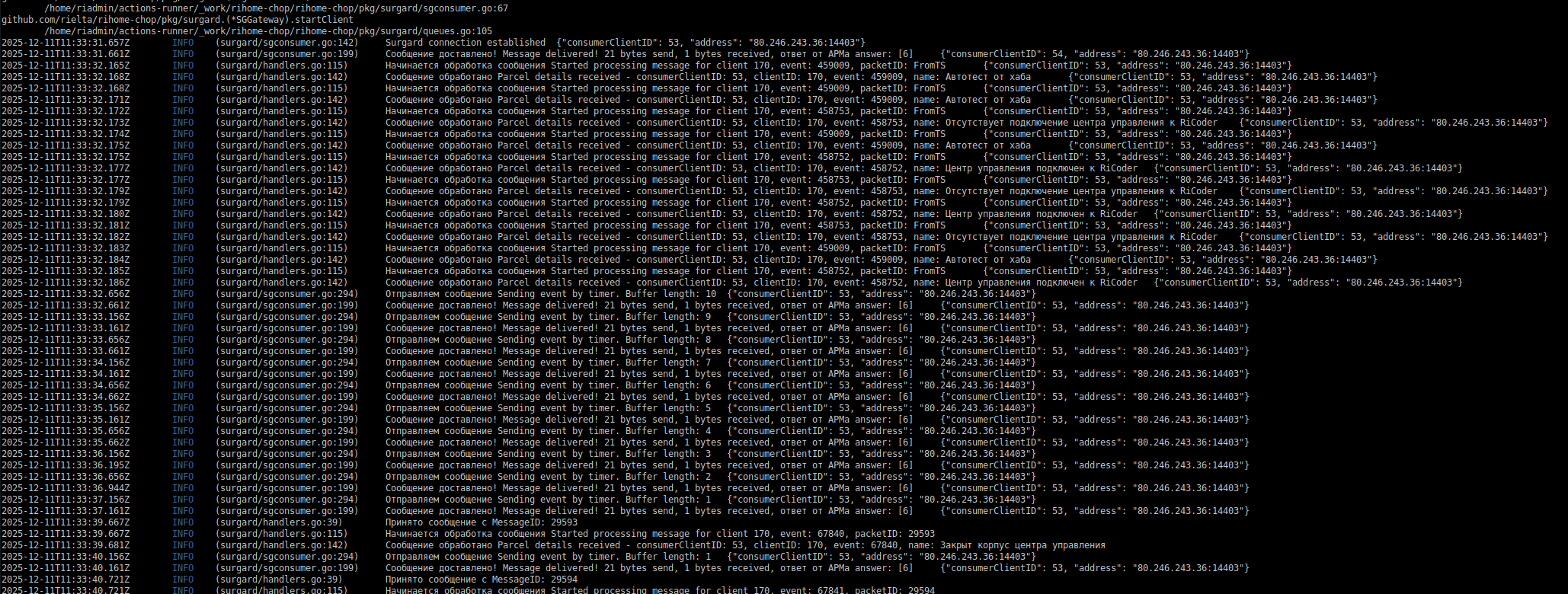
Table with decryption of the log text after the connection is restored
№ | Sign, RU | What does it mean? |
1 | Surgard connection established {"consumerClientID": 53, "address": "80.246.243.36:14403"} | The connection to the monitoring station server has been restored. address - external IP address and port of the monitoring station server consumerClientID - broadcast number |
2 | Message delivered! Message delivered! 21 bytes sent, 1 bytes received, answer from ARManswer: [6] {"consumerClientID": 54, "address": "80.246.243.36:14403"} | The message was delivered successfully. XX bytes send - XX bytes sent 1 bytes received - response received |
3 | Message processing begins Started processing message for client 170, event: 459009, packetID: FromTS {"consumerClientID": 53, "address": "80.246.243.36:14403"} | client - RiHUB number event - ? packetID: From TS - a sign that messages were transferred to the workstation from the table Troublesend. |
4 | Message processed Parcel details received - consumerClientID: 53, clientID: 170, event: 459009, packetID: FromTS {"consumerClientID": 53, "address": "80.246.243.36:14403"} | The code matching process has completed successfully. packetID - package left from RiHUB clientID - RiHUB number consumerClientID - broadcast number |
5 | Sending a message Sending event by timer. Buffer length: 1 {"consumerClientID": 53, "address": "80.246.243.36:14403"} | Sending a message to the monitoring station. address - external IP address and port of the monitoring station server |
6 | Message delivered! Message delivered! 21 bytes sent, 1 bytes received, answer from ARManswer: [6] {"consumerClientID": 53, "address": "80.246.243.36:14403"} | The message was delivered successfully. XX bytes send - XX bytes sent 1 bytes received - response received |
Screenshot of the log
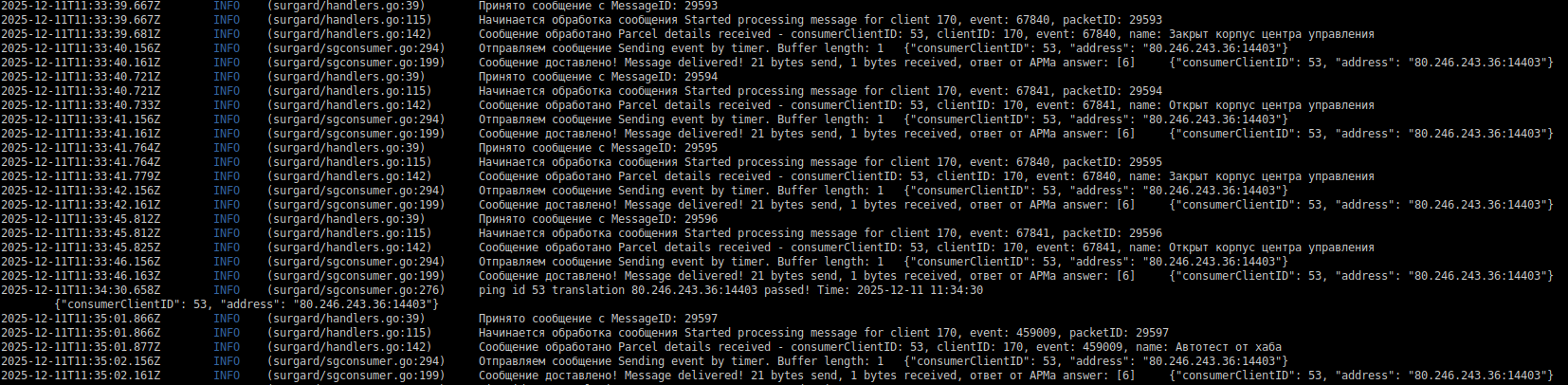
A sign of correct broadcast operation - message numbers MessageID from a specific RiHUB follow one after another. For example: MessageID: 29593, 29594, 29595, 29596, you can see that messages arrive one by one - normal operation.
4.3. No connection to the monitoring station
The surgard-1 container cannot send data to the monitoring station server - the connection is broken, ERROR level errors appear in the logs. Connection status with the monitoring station server in the RiCoder web panel - Connection error, events are not broadcast.
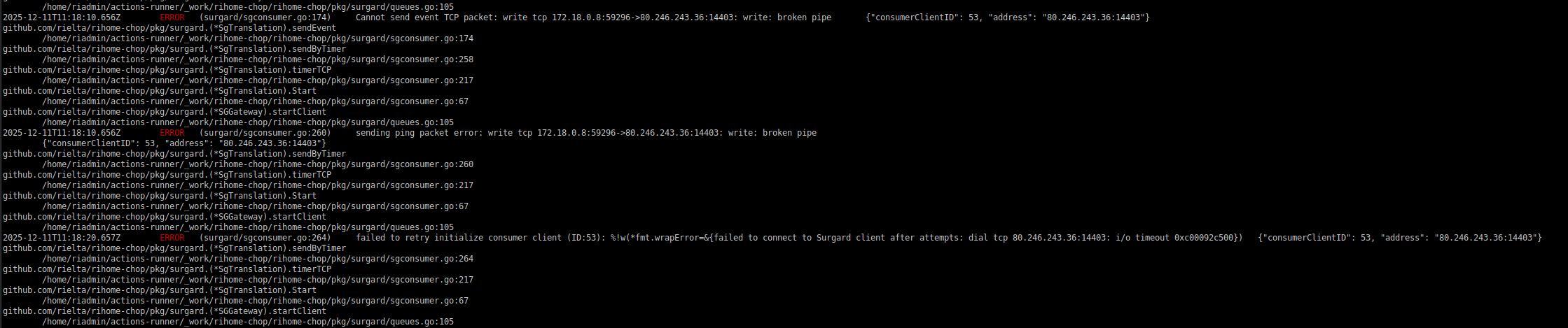
Description of error messages
Text errors | What does it mean? | Reason |
Cannot send event TCP packet: ... write: broken pipe: | An unsuccessful attempt to write data to the TCP connection established with the monitoring station server. | The monitoring station server is turned off, frozen, overloaded. |
sending ping packet error: | An attempt was made to send a service packet for pinging, but it was discovered that the server had already closed the connection. Requires reconnection. | Application layer error. The dispatch of the service packet is initiated by the container component. Command ping is not an ICMP ping. |
Failed to retry initialize consumer client (ХХХ): | Internal container component (consumer client) could not re-establish connection with the monitoring station even after several attempts. | Application layer error. |
Troubleshooting
If any error described in the table above or all at once occurs, then you must:
1. Check the availability of the remote monitoring station server using commands in the console:
# Enter the container
docker exec -it <container_name> sh

# Try to connect to the port (!not ping)
nc -zv X.X.X.X XXXXX
# or
telnet X.X.X.X XXXXX
2. Find out from the monitoring station server support service whether the server is stable and does not terminate long connections.
3. Wait for the connection to the monitoring station server to be established.
When the connection to the monitoring station is established, a message is displayed in the log and the process of transmitting untransmitted events from the Troublesend table is started. Read more...
INFO ... Surgard connection established {"consumerClientID": XX, "address": "X.X.X.X:XXXXX"}If the monitoring station server is working correctly, you need to check the network settings in the RiCoder web panel for the monitoring station server. More details in article.
Update date: 06/08/2026
No comments to display
No comments to display