
Entry and exit delay
Entry and exit delays in a security system give time to enter or exit a room without triggering an alarm. Set up an entry delay to allow time to disarm the system. Exit delay will allow you to leave the premises after the security is turned on.
Entry and exit delaysod are supported only by motion sensors Ri-MD-1 and opening Ri-DO-1.
Entry/exit delay is a potential vulnerability, as it gives attackers additional time to penetrate a protected facility. If you want the alarm to be transmitted instantly, do not use an entry/exit delay.
If the keyboard is not added to the RiDom system, then the entry and exit delay function is available in the opening sensor settings.
1. Exit delay
Exit delay is the time you have to leave the premises after arming the security mode. The system waits until you leave the room and does not raise an alarm based on security events from motion and opening sensors.
1.1. Delay setting
The exit delay is set in the device settings (motion and opening sensor).
Available exit delay parameters: 30\40\50\60\90\100\110\120\180\240.
Screen Setting up the opening sensor
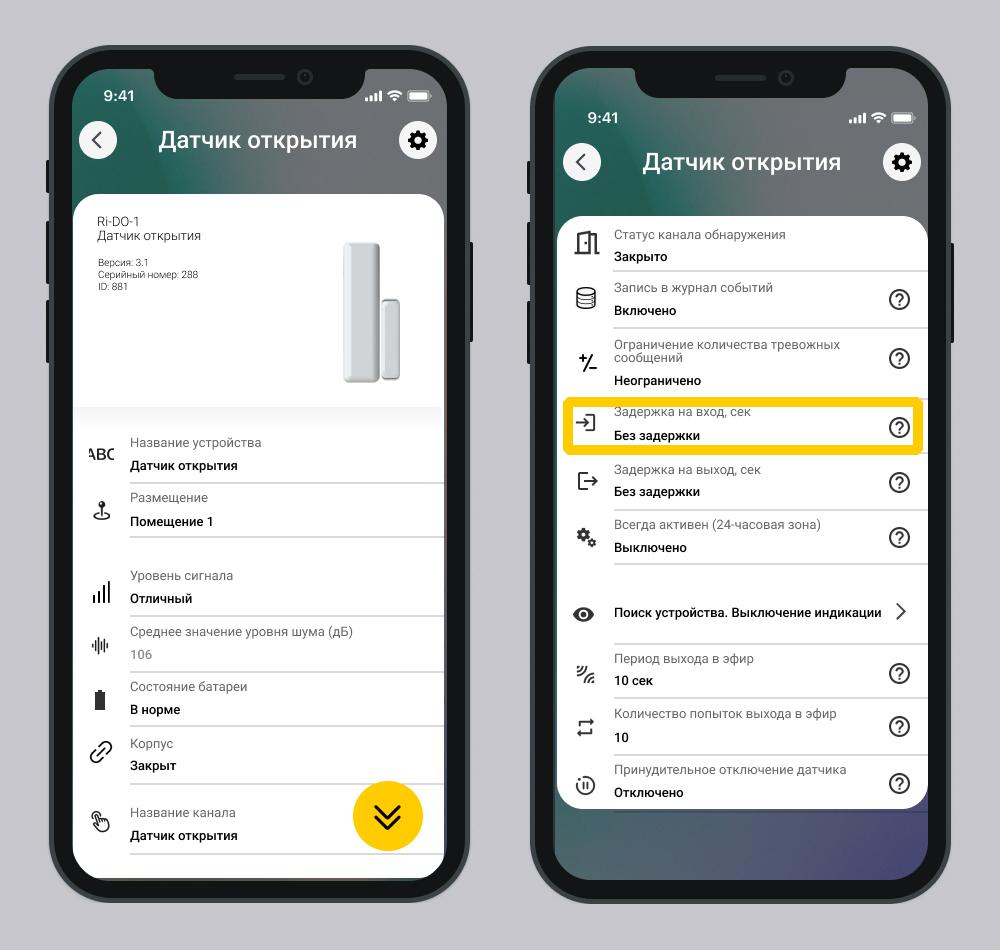
The exit delay is calculated based on the sensor that has the maximum delay among all security sensors of the selected room or house/object, if the entire house is armed.
Example: There are three sensors in the room with a time delay for exit of 30/60/90 seconds. The maximum exit delay time is 90 seconds.
Events that occur during the delay period are not recorded in the log.
1.3. How exit delay works
1. After pressing the key fob button and entering the code on the keyboard, the countdown starts exit delay.
2. The security system waits until the initiator of arming leaves the premises.
If the security sensor is triggered while the exit time is counting down, the security sensor does not send an alarm to the controller.
3. When the exit time expires:
- The system will arm only those premises that are allowed for the entered code or assigned to the key fob user.
- An event is generated in the log - Armed.
- The keyboard beeps - single "beep" sound. The signal may arrive with a slight delay.
- The key fob indicator light turns green for 3 s.
- Controller, keyboard and siren – do not emit sound signals.
4. If the initiator of arming did not have time to leave the premises, an alarm will sound.
- An event is generated in the log - Alarm.
- The siren emits a sound depending on the settings made in the mobile application.
- Controller, keyboard - do not emit sound signals.
Regardless of the settings of the sensor delay parameters, the indication on the “keyboard” actuator flashes green for 60 seconds.
1.4. Indication on the controller and actuators during the delay
- The controller and siren do not make sounds during the entire exit delay countdown.
- The keyboard flashes green for 60 seconds.
The devices do not have color indication.
2. Entry delay
Entry delay (alarm activation delay) — this is the time you have to disable the system security mode after entering room.
If a delay is set, the armed device starts a countdown and does not raise an alarm until it completes. This operating mode is intended for devices that control the entry point to an object and the exit point from a protected object. An event arrives; there is a delay at entry; look elsewhere
2.1. Delay setting
The entry and exit delay is set in the device settings (motion and opening sensor):
Available exit delay parameters: 30\40\50\60\90\100\110\120\180\240.
Screen Device settings
1. You enter a protected premises, an opening or motion sensor is triggered.
2. The controller registers a technical alarm:
- The system includes a countdown;
- An event is generated in the log - Attention input. Start of delay countdown.
- Duplicate sensors do not raise an alarm.
3. During the countdown, you disarm the house/object or premises by any means (mobile application, keyboard, key fob)
- An event is generated in the log - Disarmed.
- Controller, keyboard - do not emit sound signals.
4. If you did not manage to disarm the house/object or premises within the specified time, an alarm will sound.
- An event is generated in the log - Alarm.
- The siren emits a sound depending on the settings made in the mobile application.
- Controller, keyboard - do not emit sound signals.
If several sensors with a set entry time are violated in a room, an alarm is generated upon completion of the first expired timer, based on the minimum time of the active entry timers.
Description of the software operation is relevant for versions:
- RiDom application - v. 1.1.273
- iCloud cloud service - v. 2026-03-05-8fd1236
- Controller firmware - v. XX.1.70
Update date: 03/26/2026
Нет комментариев для отображения
Нет комментариев для отображения