
Remove RiCoder
RiCoder software removal deployed in Docker using the installation wizard. Step-by-step instructions.
1. Before removing RiCoder, create a backup using the installation wizard.
Backups are also created automatically every 24 hours by the RiCoder DBMS.
2. Remove RiCoder from the server using Docker Desktop:
2.1 Open the Containers panel in Docker Desktop.
2.2 Select all containers with the chop prefix and click Delete (trash icon).
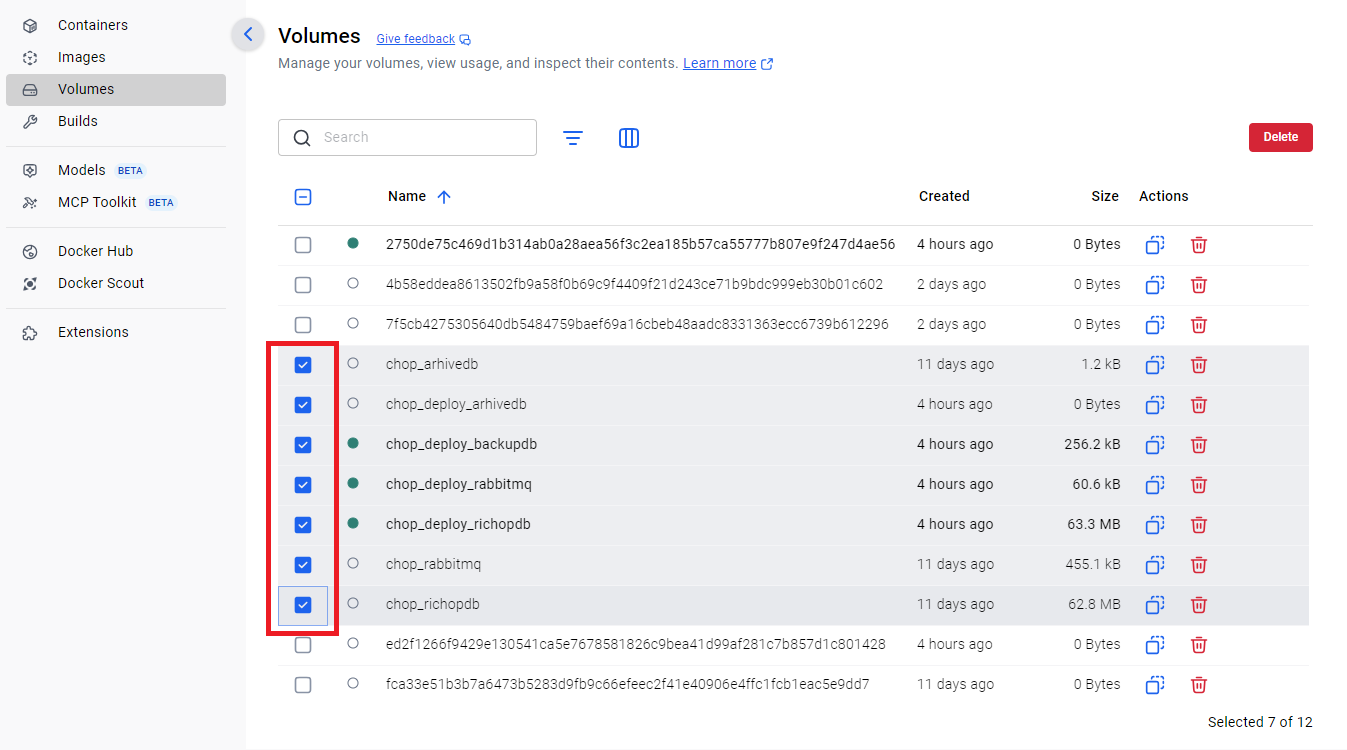
2.3 Open the Volumes panel.
2.4 Select all volumes with the chop prefix and click Delete (trash icon). This removes Docker volumes (data storage) related to RiCoder containers.
Docker Desktop screen: Volumes
Last updated: 17.09.2025
Нет комментариев для отображения
Нет комментариев для отображения