
RiCoder Software Update
RiCoder software update deployed in Docker using the installation wizard. Step-by-step instructions.
RiCoder Update
Use the same installation wizard that was used to install RiCoder on the server.
If a newer installation wizard version is available, download it, unpack it, and place the authorization key in `\CHOP_DEPLOY\`.
- Ensure Docker Desktop is running (Engine status is running).
- Prepare RiCoder UI and server version numbers for the installation wizard. Version details: FAQ.
- Find the folder containing the RiCoder installation wizard:
\CHOP_DEPLOY\. - Run launcher_windows.exe.
- Select installation language and press Enter after the information message.
- Select mode First launch / Update and enter 1.
RiCoder installation wizard screen
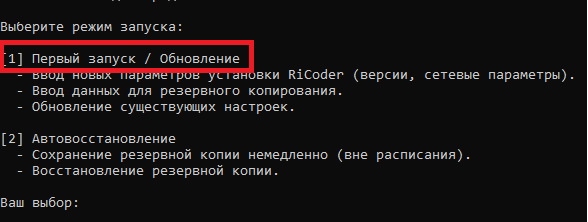
- Re-enter all main data in the installation wizard:
- RiCoder UI and server version numbers.
- Local network server address and port.
- Backup data (Yandex Disk token and backup directory).
During update, all requested data must be entered again, even if only one value changed (for example, version number, server address, or port).
- Select create / configure backup. Backup copies will be saved to the directory specified in this wizard session.
- Wait until reboot and container setup are complete. If input data was entered incorrectly, close the wizard, open it again, and enter correct values.
- Close the installation wizard.
For troubleshooting details, see [Windows errors and solutions](https://wiki.ridom.ru/books/frequently-asked-questions) and [Linux errors and solutions](https://wiki.ridom.ru/books/frequently-asked-questions). For data-entry specifics, see [RiCoder installation and initial setup](https://wiki.ridom.ru/books/instructions-in-english/page/working-with-the-ricoder-installation-wizard).
Docker Desktop Update
Docker Desktop automatically notifies users about available updates. You can perform the suggested update without stopping or interfering with RiCoder operation.
In rare cases, after some updates, Docker Desktop may require a server reboot. In this case, RiCoder will be temporarily unavailable until restart is complete.
Last updated: 17.09.2025
Нет комментариев для отображения
Нет комментариев для отображения